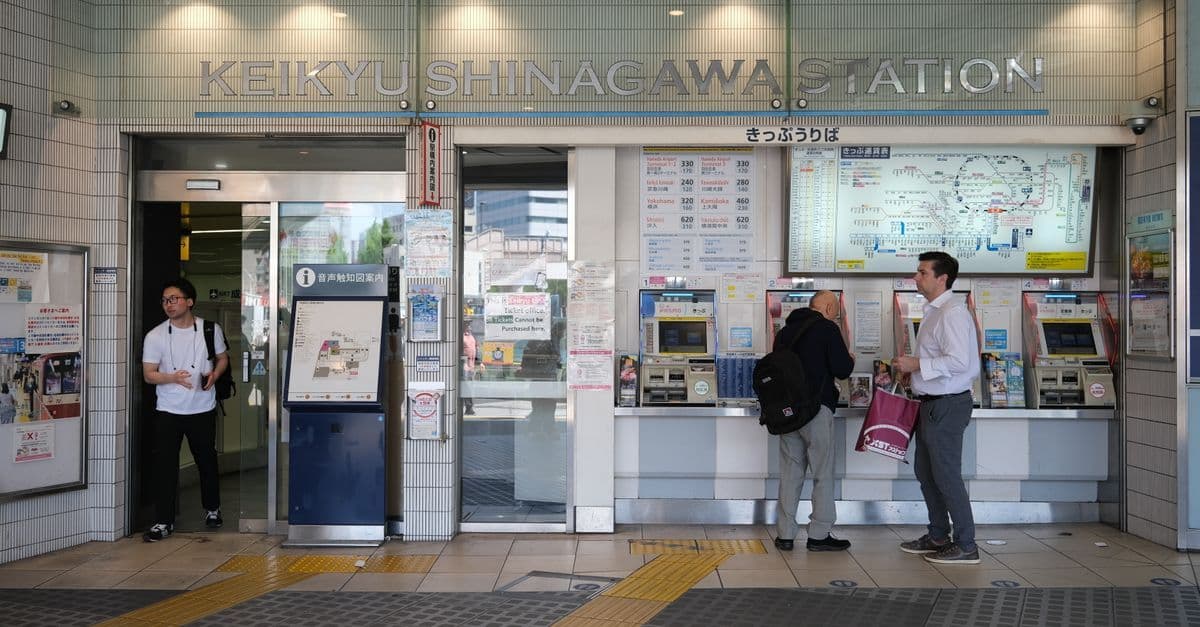
Set up a HelloRoam Japan eSIM before you leave and you're sorted on arrival. Google Maps, train times out of Narita or Haneda and messages home all work once you land and switch the line on.
We checked the Telstra, Optus and Vodafone prices, the phone steps, the airport details, Japan's network figures and our own plan list on 6 November 2026, on the pages listed in the sources below. Prices, plans and counter hours change, so check the official page before you fly.
What Telstra, Optus and Vodafone charge in Japan
On a postpaid plan, your Australian number can roam in Japan for a daily fee. Each carrier charges for each day, or each 24 hours, that you use your phone there:
 Get your Japan eSIM before you flyInstall it at home, then turn on data roaming for it when you land. From A$4.54.See Japan plans
| Plan | Fee in Japan | Data | 14 days of daily use |
|---|---|---|---|
| Telstra Day Pass | $10 a day | 2GB a day | $140 |
| Optus Daily Roaming (Choice Plus and other eligible plans) | $5 per 24 hours | 5GB per 24 hours | $70 |
| Vodafone $5 Roaming (eligible plans) | $5 a day on top of your plan | Your plan's data, then 1GB for $5 | $70 plus your plan |
The 14-day totals assume you stay inside each day's data. Go past it and the bill grows. Optus adds another 5GB for $5, and Vodafone adds 1GB for $5. Telstra's Data Top-Up is 2GB for $10, valid for 31 days: non-Upfront plans get one by itself, and Upfront plans get a text offering one. On selected other Optus postpaid plans, a $10 Roaming Pass gives 1GB for 24 hours in Zone 1 destinations, and Optus's rates finder puts Japan in Zone 1. Telstra's Day Pass and Optus Daily Roaming include unlimited standard calls and texts, and Vodafone's uses your plan's own calls and texts. For a trip of a day or two, or one full of calls home, roaming is the simpler pick.
Sort it out before you fly. Telstra's Day Pass is switched on in My Telstra under Extras and International Roaming, and Telstra says it can take up to 2 hours to activate. Optus Daily Roaming switches itself on in Zone 1 destinations, and the My Optus app shows whether your plan has it under Add-ons. If your Optus plan uses the $10 Roaming Pass instead, opt in before you fly in the My Optus app, under More settings and International Roaming. Only Choice Direct Debit plans are opted in automatically. Vodafone says roaming is already active on most of its plans, and My Vodafone or a call to 1555 confirms it before you leave.
Receiving a text doesn't start Telstra's Day Pass, Optus Daily Roaming or Optus's $10 Roaming Pass, and Vodafone charges its $5 only on days you use data, make or receive a call, or send a text. So a travel eSIM can carry your data while bank codes still reach your Australian number without a day charge. Answering a call or sending a text starts the charge with all three carriers, and so does any data use, including apps refreshing in the background, which Telstra counts as use. Optus says checking voicemail, or a call that diverts to it, may start it too. Keep mobile data on the eSIM line. Our guide to roaming plans for Australians compares postpaid day passes and prepaid roaming packs.
Phone and plan checks before you leave Australia
Run these checks at home before you fly. The first one matters whichever way you get online, and the rest apply if you pick a travel eSIM:
- Your phone can take it. Apple's travel eSIM guide lists the iPhone XS, XS Max, XR and later, and says the phone can't be locked to a carrier. On an iPhone, Settings > General > About shows "No SIM Restrictions" when it's unlocked. For Android, see which phones take an eSIM.
- It names its Japanese network. A travel eSIM runs on one or more of Japan's own carriers, so the plan page should say which ones.
- Its days and data fit your trip. Validity should cover every day from landing to take-off, and the data should cover your busiest days.
- It allows hotspot sharing, if a travel partner's phone or your laptop will lean on your data.
- Support answers at any hour. An activation problem in the arrivals hall needs help then, not the next business day, so check the support hours and channels before you buy.
- It states its refund rule, in case the trip changes.
Check whether the plan comes with a phone number. Ours is data only, with no Japanese number, so your Australian SIM stays in the phone for calls and texts. Apple says an iPhone with a SIM tray can use a physical SIM and an eSIM at the same time.
Japan's four mobile networks, and why the plan's network matters
Japan's telecom ministry names four mobile carriers in its July 2026 5G report: NTT Docomo, KDDI (with Okinawa Cellular), SoftBank and Rakuten Mobile. KDDI's mobile brand is au.
The same report puts 5G coverage at 98.6% of Japan's population by the end of March 2026, and between 89.2% and 99.9% in each prefecture. That national figure combines all four carriers' coverage areas, not any one network's. Coverage differs from place to place, so if your route leaves the big cities, check the service area map of the network your plan uses. All four carriers publish one, mostly in Japanese.

How much data a Japan trip needs, and when unlimited is worth it
The hourly rates in our trip data calculator put maps at about 10MB, photo feeds at about 110MB, web browsing at about 47MB and messaging at about 3.3MB. A one-on-one video call takes about 520MB an hour, and HD video about 1.4GB.
The calculator's Casual traveller day has half an hour of maps, an hour each of browsing and music, half an hour of messages and email, 15 minutes each of photo feeds and short video clips, and half an hour of app updates. That comes to about 0.46GB a day. Over 10 days it's about 4.6GB, so buy at least 5.5GB, which adds 20% for busy days. Over 14 days it's about 6.4GB, so buy at least 7.7GB, and a 10GB plan covers that fortnight with room to spare.
Add an hour of HD video a day and the same fortnight needs about 26GB, or at least 32GB with the 20% margin. So 20GB covers a fortnight of sightseeing but not daily streaming, which puts you in 50GB or unlimited territory. Unlimited also suits long video calls or a hotspot shared with family. Read its fair-use terms first.
Count every day from landing to take-off when you check a plan's validity. If your route isn't set yet, our 10 and 16-day Japan itineraries give you a day count to work from.

Here's how that plays out by trip:
- Maps, messages and social media for a week or two: a fixed plan sized with the calculator.
- Daily streaming, remote work or a hotspot for the family: unlimited.
- A group sharing laptops and tablets: pocket Wi-Fi can suit better (see the last section).
- Lots of calls home on your own number: a Telstra or Optus pass, which includes unlimited standard calls.
- A phone locked to your carrier: roaming or pocket Wi-Fi, because a locked phone can't take another seller's eSIM.
What our Japan plans include
HelloRoam sells these plans, so we're not neutral on this part. Our editorial policy explains how we handle that conflict.
As listed on 6 November 2026, our 1GB, 3GB, 5GB, 10GB and 20GB Japan plans run on KDDI (au) and SoftBank, the 50GB plan runs on NTT Docomo, and the 2GB 15-day plan and the unlimited plan can use all four networks. Networks can change, so the plan page shows the current list. Unlimited plans carry no daily data cap. Fair-use terms apply.
Every plan is data only and allows hotspot sharing. A plan's days start when the eSIM first connects to a network in Japan, so installing it at home costs you no days. Support is 24/7 chat on WhatsApp and in the app, or email at help@helloroam.com.
If the trip falls through, this is our refund rule. Full refund within 180 days if your eSIM has not connected to a network. Installing it does not count. Running low on data? Top up in our eSIM app before the plan's end date. An expired eSIM can't take a top-up, so after that you'd buy a new plan.
Installing at home and switching on in Japan
Set the eSIM up in Australia, on Wi-Fi. Apple's list of what you need includes a Wi-Fi network or hotspot. Then:
- Scan the QR code from your order email before you leave, then keep the new line switched off until you land. Our step-by-step install guide covers iPhone, Samsung and Pixel.
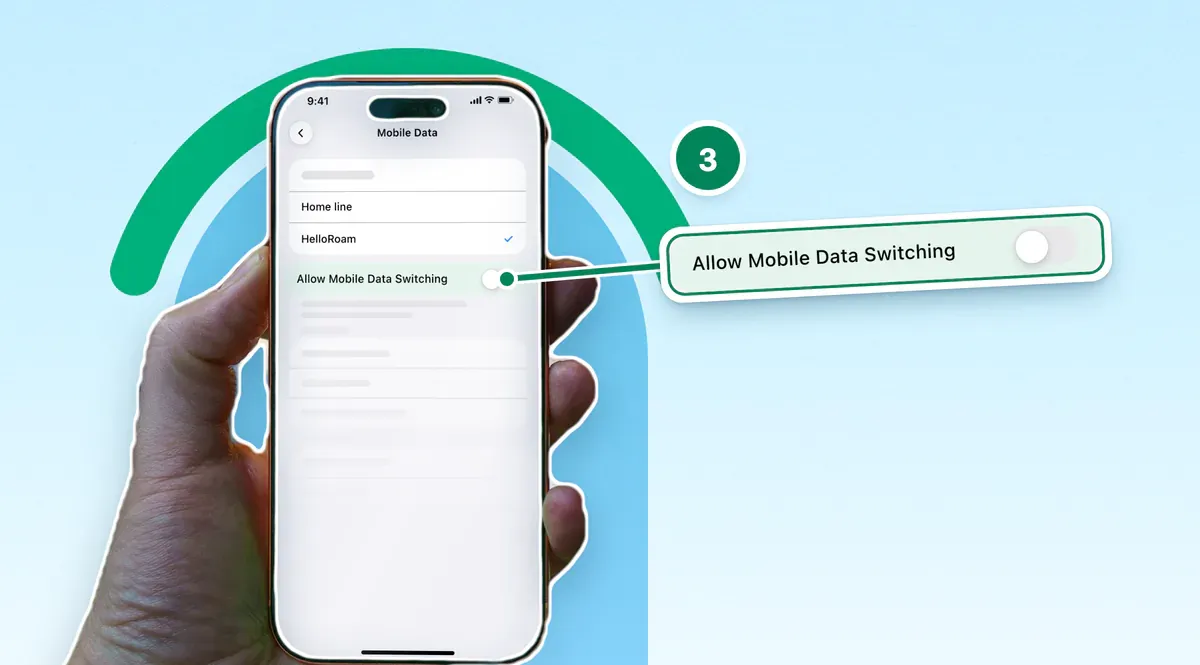
- When you land, turn the Japan line on, turn on its data roaming and make it your mobile data line.
- Keep your Australian line on for calls and texts, and turn off automatic data switching (Allow Mobile Data Switching on an iPhone). Telstra warns that devices with both an eSIM and a physical SIM can switch data SIMs while roaming, which triggers charges.
- Turn off data roaming on your Australian line only where it has its own switch, as on an iPhone or a Pixel. Samsung's roaming steps show one Data Roaming switch for the whole phone, so on a Galaxy leave it on and keep mobile data set to the eSIM.
Trade-offs that come with a Japan eSIM
An eSIM isn't the right pick for everyone. Weigh these before you buy:
- It needs an eSIM-ready phone that isn't locked to your carrier.
- Ours is data only. A call to a Japanese phone number, like a restaurant's booking line, goes through your Australian line, which your carrier bills as roaming. Calls home can go over data with WhatsApp or FaceTime.
- Setup needs Wi-Fi and a few minutes, so it's easiest at home.
- With ours, once the eSIM has connected in Japan its QR code can't be used again, so deleting it is permanent. If data stops, contact support instead.
- It stays on the phone you install it on. Ours can't be moved to another phone.

Airport SIM counters, pocket Wi-Fi and free Wi-Fi as backups
The Japan National Tourism Organization (JNTO) says visitors commonly buy or rent a SIM card, eSIM or pocket Wi-Fi at the airport, or reserve one online and pick it up there. It calls eSIMs and pocket Wi-Fi especially convenient for short stays.
Counter hours matter if you land late. In the arrival lobby of Haneda's Terminal 3, the two SIM and Wi-Fi rental counters the airport lists open at 6 am and 6:30 am and close at 11 pm. One also offers 24-hour unmanned Wi-Fi rental out front.
Pocket Wi-Fi suits a group sharing one connection across phones and laptops, but it's one more device to carry, charge and return. Our pocket Wi-Fi guide for Australians compares rental, prepaid and eSIM options. A physical SIM suits an unlocked phone with no eSIM, and our eSIM and SIM card comparison covers the trade-offs.
Free Wi-Fi is a backup, not a plan. Haneda offers free HANEDA-FREE-WIFI in its terminals, enough to install an eSIM you forgot to set up at home. For the ride into town, our guide to the Tokyo transport card shows how to buy one, top it up and tap with your phone.
Sources
- Telstra: International roaming on a plan, Day Pass zones and chargestelstra.com.au
- Optus: International roaming, Daily Roaming and the $10 Roaming Passoptus.com.au
- Optus: International roaming rates finder (postpaid)optus.com.au
- Vodafone: International roaming and $5 Roamingvodafone.com.au
- Vodafone: $5 Roaming destinations list (Japan)vodafone.com.au
- Apple Support (AU): Use eSIM while travelling internationally with your iPhonesupport.apple.com
- Apple Support (AU): Use Dual SIM with an eSIM (Allow Mobile Data Switching)support.apple.com
- Apple Support (AU): About mobile data roaming options (Data Roaming per number on Dual SIM)support.apple.com
- Samsung: How to turn international data roaming on or off on my Samsung phonesamsung.com
- Google Pixel Help: Change mobile network settings (per-SIM settings, Roaming)support.google.com
- Ministry of Internal Affairs and Communications (Japan): 5G rollout at the end of FY2025, 27 July 2026soumu.go.jp
- NTT DOCOMO: Communications and service areasdocomo.ne.jp
- au (KDDI): Service areaau.com
- SoftBank: Service area map (Japanese)softbank.jp
- Rakuten Mobile: Communications and service area (Japanese)network.mobile.rakuten.co.jp
- Japan National Tourism Organization (JNTO): Frequently asked questions, SIM card, eSIM or Wi-Fijapan.travel
- Haneda Airport: Cell phones, Wi-Fi rental and SIM cardstokyo-haneda.com
- Haneda Airport: Free Wi-Fi (HANEDA-FREE-WIFI)tokyo-haneda.com
- HelloRoam: eSIM for Japan, plans and networkshelloroam.com
- HelloRoam: Data usage calculator, data per activityhelloroam.com
- HelloRoam: Refund policyhelloroam.com
- HelloRoam: Contact us (24/7 WhatsApp and email)helloroam.com
- HelloRoam: Install an eSIM on iPhonehelloroam.com
- HelloRoam Help: When to install before a triphelloroam.com
- HelloRoam Help: Turn on data roaminghelloroam.com
- HelloRoam Help: Top up your datahelloroam.com
- HelloRoam Help: When it is safe to remove your eSIMhelloroam.com
- HelloRoam Help: Calls, texts and your numberhelloroam.com
- Ministry of Internal Affairs and Communications (Japan): 5G rollout at the end of FY2025, annex (national figure overlays the four carriers' areas)soumu.go.jp
- Optus Support: Optus Daily Roaming explained (usage that will and won't trigger a $5 charge)optus.com.au
- Optus Support: Optus $10 Roaming Pass (usage that will and won't start a pass)optus.com.au
Written by
HelloRoam Team
The HelloRoam Team writes our guides on trip planning, visas and eSIMs. For every new or updated guide, we check each fact at its source. Sources include government, park and weather service pages. We note the date we read each one. A second review then checks every fact against its source before the guide goes live. If we cannot confirm a fact, we leave it out. We link those sources inside the guide, so you can check them.