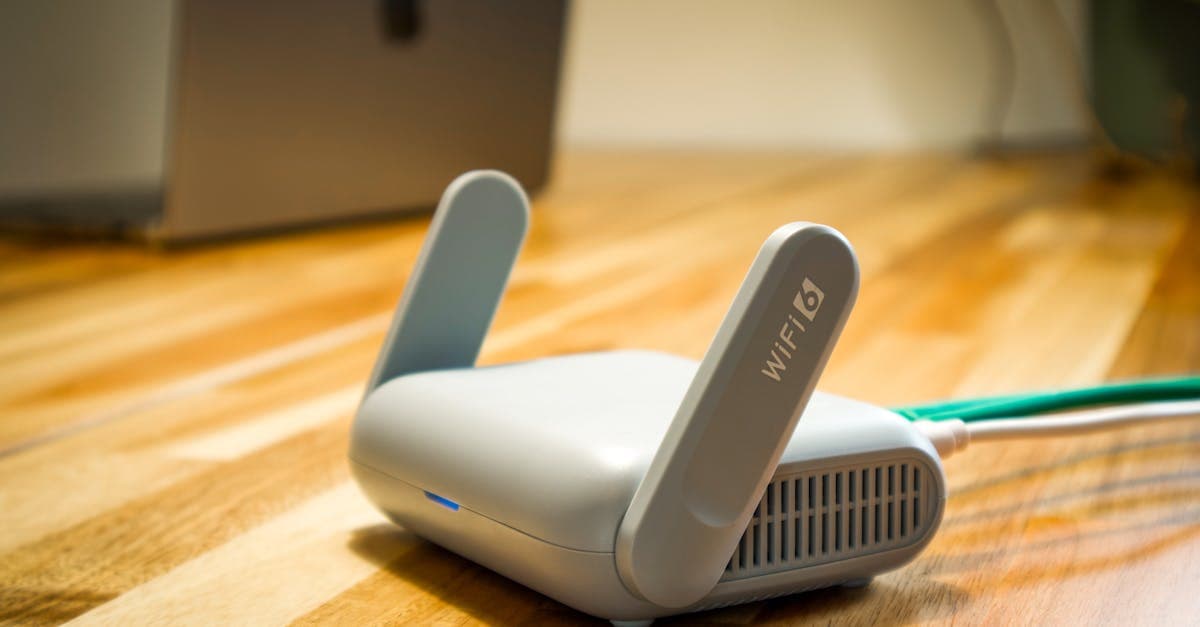

What is portable WiFi?
The bit most guides skip: that description covers three quite different products. Dedicated pocket WiFi routers are the original solution, small hardware devices you rent or purchase, each running their own SIM card. Smartphone hotspot tethering turns your existing handset into a temporary router via a roaming or local SIM. And eSIM data plans, the newest category, activate entirely inside your phone with no physical card and no extra hardware to carry. HelloRoam sits in that last group: its eSIM plans cover 185+ destinations, so your phone has data from the moment you land, with no router to charge or hand back.
The concept took off in Japan and South Korea in the early 2010s, where local carriers began renting compact 4G routers to inbound tourists. The original problem was clear: hotel Wi-Fi was patchy, carrier roaming rates were punishing, and a device with a local SIM sorted both at once. The idea spread fast. By the mid-2010s, airport pocket WiFi kiosks were standard across Asia and spreading through Europe and the Americas.
It's a different landscape in 2026. Australians heading overseas now have more connectivity options than at any previous point: rental routers, local SIM cards bought on arrival, carrier roaming packs and eSIM plans that activate in under two minutes. The pocket WiFi router still earns its keep for group travel, where multiple people sharing one connection makes the maths work.
Your right pick depends on destination, group size, the phone in your pocket and how long you'll be away. Understanding how each option actually works is the sensible place to start.
How does a portable WiFi device actually work?
A pocket WiFi router works by fitting a SIM card into a cellular radio, connecting to local towers as a smartphone would, then rebroadcasting that signal as a private Wi-Fi network. Your phone, tablet or laptop joins it exactly as it would at home or in a hotel.
Data travels in two hops: tower to device over 4G LTE or 5G, then out over the device's local Wi-Fi broadcast, which reaches roughly 10 to 15 metres. A solid cellular connection with the router nearby outperforms a weak signal buried in your bag.
Sounds simple enough. In practice, battery life is where most rental trips hit their first snag. Most devices manage 6 to 10 hours on a full charge. A full day out, with the router on continuous hotspot duty, often means a mid-afternoon recharge. Pack a power bank.
Coverage depends entirely on which carrier's SIM the rental device uses. In Australia, Telstra holds the widest rural reach. Optus and Vodafone are reliable in capital cities but thin out past the major centres. For overseas rentals, check which local network the device runs on before committing.
An eSIM hotspot works identically from every connected device's point of view. The cellular radio lives inside your smartphone rather than separate hardware, removing the battery dependency and one more thing to return before your flight home.
How a device works is one thing. What it costs over a full trip is where the comparison shifts.
How much does a pocket WiFi cost?
Pocket WiFi rental typically runs ~A$8 to ~A$15 per day. That's the starting price, not the full cost. Most providers add a refundable security deposit of ~A$50 to ~A$200 on top, plus a one-off delivery or airport collection fee.
Run the maths on a two-week trip at ~A$12 per day and rental alone reaches ~A$168, before the data allowance is factored in. Some plans bundle data; others charge per gigabyte on top. The fine print changes that tidy daily rate quickly.
Buying a device outright sidesteps the return obligation but not the ongoing costs. Hardware runs ~A$80 to ~A$300, and you'll still need local SIM cards or data add-ons for each destination. The upfront saving diminishes across multiple trips.
Late return fees on rental devices commonly sit at ~A$20 to ~A$40 per additional day. Most renters don't clock this until they're already at the airport.
Carrier roaming packs from Australian providers typically run ~A$10 to ~A$15 per day for an international data pack. Sensible for a long weekend. For two weeks, that daily rate becomes a genuine budget line you'll notice on the card statement.
eSIM data plans for popular destinations generally fall in the ~A$15 to ~A$40 range for a full week, with no hardware to post back, no deposit and no return deadline. Visiting more than one country? A HelloRoam regional plan covers several countries on one eSIM, so you skip buying a fresh SIM at every border.
Cost explains part of the decision. The comparison gets more revealing when you weigh convenience, security and what actually happens the moment you land.
Portable WiFi vs eSIM vs local SIM: which option wins?
No single option suits every trip. For a solo traveller with a compatible smartphone, eSIM is the clear pick in 2026: activate via QR code in under two minutes, arrive with data already running, and cancel the plan remotely if your phone goes missing. Pocket WiFi routers lead where multiple devices need simultaneous coverage. Local SIMs offer the sharpest per-gigabyte rates in most destinations, but you lose your Australian number for the duration and need an unlocked handset to swap cards.
The bit most guides skip: stolen hardware risk. Lose a rental pocket WiFi router abroad and you forfeit the security deposit, while every person in your group goes offline at once. With an eSIM, you cancel via app and reactivate on a replacement device. That asymmetry is sharper than it looks on paper.
Environmental footprint rarely appears in these comparisons, but it should. Pocket WiFi rental involves device manufacture, packaging and courier logistics repeated every rental cycle. An eSIM generates zero plastic waste and requires no shipping. For travellers who factor in their footprint, the gap is real.
Set up a HelloRoam eSIM at home and you touch down with data already running, with no rental kiosk to find past customs and no device to hand back before your flight home.
| Pocket WiFi rental | Local SIM | eSIM | |
|---|---|---|---|
| Setup time | 1-3 business days delivery, or airport kiosk queue on arrival | Airport or street kiosk; time varies | Under 2 minutes; completable before landing |
| Weekly cost | Based on daily rate above, plus deposit | Lowest per-GB of the three | Varies by destination; no deposit required |
| Devices connected | Typically up to 10 simultaneously | One device, plus hotspot if supported | One device, plus hotspot if supported |
| Data top-up | Support call required; can take hours to process | New SIM or in-store top-up | Instant via app |
| Stolen or lost | Deposit forfeited; group loses connectivity | Replace SIM locally | Cancel via app; reactivate on any compatible device |
| Environmental impact | Device manufacture, packaging and shipping each cycle | Plastic SIM card and packaging | Zero plastic waste |
The setup process itself deserves a closer look, because the practical difference between a two-minute activation and a two-hour airport queue changes how a trip actually starts.
Setup time and activation: rental device vs digital eSIM
eSIM activation completes in under two minutes: purchase a plan online, receive a QR code by email, scan it in your phone settings, and data registers on the network immediately. Pocket WiFi rental requires 1 to 3 business days for standard delivery, a refundable security deposit, and a return by an agreed deadline.
Renting a pocket WiFi router: 1. Choose a plan online and provide ID documentation 2. Pay a refundable security deposit 3. Wait 1-3 business days for standard delivery, or join the airport kiosk queue on arrival 4. Return the device before the agreed deadline or pay an extension fee
Activating an eSIM: 1. Purchase a plan online 2. Receive a QR code by email 3. Scan the code in your phone's settings 4. Network registration completes within two minutes
The difference hits hardest on last-minute trips. Most rental services need 24-48 hours for standard delivery, and airport kiosk availability varies by terminal and time of day. The entire eSIM process can be completed on the plane before you land.
Mid-trip top-ups follow the same pattern. eSIM platforms process additional data instantly via app. Rental plan upgrades typically require a support call and can take several hours to action. Finding out you've burned through your allocation in central Rome at 10 pm is not the moment to discover a support queue.
Dual-SIM phones add a useful wrinkle: keep your Australian number on the physical SIM for bank OTPs and incoming calls, while travel data routes through the eSIM simultaneously. No SIM card swaps, no missed verification codes.
Before any of this applies to you, it's worth confirming whether your phone actually supports eSIM and which connectivity option fits your specific device and travel setup.
What device gives you WiFi everywhere?
Any Wi-Fi-capable device connects to a pocket WiFi router. Smartphones, tablets, laptops, e-readers and smartwatches all work regardless of brand or operating system. That universal compatibility is pocket WiFi's genuine strength, particularly in groups with mixed device ages.
eSIM is more selective. Your phone must be eSIM-compatible and carrier-unlocked. Most iPhones from the XS onwards, Samsung Galaxy S20 and later, and Google Pixel 3 and later support eSIM, as do most Android flagship models from 2022 onwards. If you bought your iPhone in Australia from late 2022, there's no physical SIM tray at all: eSIM is your only option, and that covers a significant and growing share of phones in active use here.
Carrier-locked handsets are a catch. If your phone came bundled with a Telstra, Optus or Vodafone contract, it may be locked to that carrier's SIM only. A locked phone cannot activate a third-party eSIM. Check your lock status before purchasing a plan; most carriers unlock devices on request, though it can take a few days.
Dual-SIM phones sit in the sweet spot. Keep your Australian number live on the physical SIM for calls and OTPs, while all travel data routes through the eSIM. This is the setup most frequent Australian travellers end up on, and it removes the awkward trade-off between staying reachable at home and staying online abroad.
For families or groups where some members carry older devices without eSIM support, a shared pocket WiFi router still makes practical sense as the primary connection, particularly for laptops on the road. In that scenario, pocket WiFi's universality is a genuine advantage, not a fallback.
Having the right device sorted is step one. The next thing most travellers wish they'd known before departure is what can go wrong with hardware-based portable WiFi.
The real downsides of portable WiFi devices worth knowing
Pocket WiFi routers carry several practical trade-offs that affect most trips: battery dependency, limited security for shared connections, hardware replacement liability, and potential region-locking. These issues tend to surface at the worst moments, far from home and without easy alternatives.
Battery dependency is the most common complaint. When the device runs flat mid-afternoon, every connected phone, tablet, and laptop drops offline simultaneously. A power bank becomes non-negotiable on full-day outings, which means one more thing in the bag and one more thing to remember to charge overnight.
Security is adequate, not airtight. WPA2 encryption covers the basics. The fiddly part is the shared password: in a group rental, that string passes through multiple phones, and you've got no real visibility over who's still connected to your hotspot.
eSIM connectivity sidesteps this. Your data runs on your phone's own encrypted cellular connection, no shared credential required.
Lost or damaged hardware is where things get genuinely cooked. Most rental agreements charge the full replacement cost, within the hardware price range noted earlier in this guide, plus the forfeited deposit on top.
That's a nasty invoice.
The detail worth knowing before you book: some devices are region-locked. A router rented for Japan may not register on South Korean networks, even if both countries appear on the provider's coverage list. Check the specific SIM and network compatibility for every country on your itinerary, not just the headline destinations.
The genuine advantage of pocket WiFi remains multi-device connectivity. Multiple phones, tablets, laptops on one plan, including hardware that lacks eSIM support. That utility is real, and it shouldn't be undersold.
All of these trade-offs play out differently depending on where you're actually travelling. Coverage reliability varies significantly by destination, and that's worth knowing before you commit to any plan.
Portable WiFi coverage by destination: what to expect in 2026
Coverage quality for any portable WiFi solution depends on one thing: which local carrier network it actually connects to. A plan riding a strong domestic network will outperform one routed through a weaker carrier, regardless of the device in your bag or the technology behind it.
Japan and South Korea are the reliable end of the spectrum. Both countries have consistent 4G and 5G coverage across urban and regional areas, and Japan remains one of the most popular pocket WiFi rental markets globally. eSIM plans on Japanese carrier networks now deliver comparable performance without the pickup queue at Narita or Haneda.
Flip that for Southeast Asia. Bali and the main tourist corridors through Thailand and Vietnam have solid coverage in built-up areas. The gaps appear in rural and island regions, sometimes abruptly. eSIM plans using multi-network SIM technology, which automatically registers on whichever available carrier is strongest, tend to hold signal better than fixed single-carrier rental devices in those patchy zones.
Europe is broad LTE territory across major destinations. EU roaming rules mean a single plan covers most of the continent, and pocket WiFi routers spanning 30 to 40 European countries on one device remain practical for multi-country itineraries where managing individual SIMs would be unwieldy, a coverage range supported by providers such as Netgear, whose mobile routers support international roaming across up to 140 countries.
The USA has rock-solid 4G LTE across metro areas, with notable gaps in rural states and along some regional highway corridors. eSIM plans on major US networks perform comparably to dedicated hotspot devices for most standard travel itineraries.
Domestic Australia is the outlier worth planning around. Telstra-based connections reach reliably into outback and remote areas. Optus and Vodafone-based plans are solid across capital cities and coastal routes but thin out past regional centres. That matters on a long drive through remote Queensland or across the Nullarbor.
The bit most guides skip: the headline country count on a marketing page tells you less than the carrier name listed in the plan details. Always confirm which specific network your rental device or eSIM plan actually connects to in each destination, before you leave home.
Questions travellers ask
How does a portable WiFi device work?
A pocket WiFi router fits a SIM card into a cellular radio, connects to local mobile towers as a smartphone would, then rebroadcasts that signal as a private Wi-Fi network. Data travels in two hops: from the tower to the device over 4G LTE or 5G, then out over the device's local Wi-Fi broadcast reaching roughly 10 to 15 metres. Your phone, tablet or laptop joins it exactly as it would at home or in a hotel.
What device gives you WiFi everywhere?
A dedicated pocket WiFi router connects any Wi-Fi-capable device regardless of brand or operating system, including smartphones, tablets, laptops, e-readers and smartwatches. For a single-device setup, an eSIM-compatible smartphone can act as its own hotspot, eliminating the need for separate hardware. Most iPhones from the XS onwards, Samsung Galaxy S20 and later, and Google Pixel 3 and later all support eSIM.
Why use WiFi on your mobile phone while travelling?
Using a local data connection via portable WiFi, eSIM or local SIM avoids expensive carrier roaming charges while travelling internationally. A local connection is typically far cheaper than international roaming packs and provides more reliable coverage. Dual-SIM phones also let you keep your home number active on the physical SIM while routing travel data through an eSIM simultaneously.
Sources
- Amazon.fr : Pocket Wifiamazon.fr
- Routeur WiFi portable RoG® Huntingpeelagreen.fr
- Routeur wifi portable - Achat en lignedarty.com
- WiFi mobile 5G fiable, rapide et sécurisé, partout avec vousnetgear.com
- Portable Hotspot Rentaltravelwifi.com
- Qu'est-ce qu'un Pocket WiFi et comment fonctionne-t-il ?hippocketwifi.com


Written by
Liam O'Brien
Liam O'Brien is a travel writer at HelloRoam who covers eSIM options and mobile data tips for travelers visiting diverse destinations. He tests network coverage on long drives, in remote natural areas, and across busy city centers. Liam helps readers understand which data plans suit short holidays and extended stays, with honest advice on coverage gaps and rural signal quality.