With the photo sorted, plan your data next. A HelloRoam China eSIM installs at home in Canada and switches on when you land, so your phone has data for the trip from the airport to where you're staying, with support on hand 24/7.
This guide sets out China's foreign ministry photo sheet, as posted by the Chinese embassy in Ottawa, and the photo lists of Canada's five Chinese visa application centres, as they stood on October 13, 2026. Centres update their lists, so look at your own centre's page once more before you print.
Check first that your trip needs a visa at all. China's visa-free notice, posted by its Toronto consulate, lets Canadian citizens on ordinary passports enter without one until December 31, 2026 and stay up to 30 days, for business, tourism, family or friend visits and transit. Longer stays and trips for other purposes still need a visa, and Global Affairs Canada's China advice asks you to confirm you qualify with the nearest Chinese embassy or consulate. No visa means no visa photo.
Applying from Canada takes one upload and one print
All five Chinese visa centres in Canada now start mainland China visa applications online at visaforchina.cn, where you pick the centre that serves your province. The digital photo goes into the form's first section, Personal information, according to the Toronto consulate's online application guide.
 Get your China eSIM before you flyInstall it at home, then turn on data roaming for it when you land. From CA$4.86.See China plans
The print comes after the online review. When your status reads "Online review completed", you take your passport, the printed Visa Application Confirmation and one paper photo to the centre. The Toronto centre's notice to applicants says you must hand in one physical photograph that meets the Chinese visa requirements at that visit.
China's foreign ministry sets the rules for the file and the print
Both versions follow one sheet from the Department of Consular Affairs of China's Ministry of Foreign Affairs. The Chinese embassy in Ottawa posts it as its visa photo requirements page, and the Toronto and Montreal visa centres post the same sheet.
| Rule | Digital photo for the online form | Paper photo for the visa centre |
|---|---|---|
| Size | 354 x 472 to 420 x 560 pixels | 33 mm wide x 48 mm high |
| File | JPEG, 40 to 120 KB, RGB 24-bit colour | Not a file: a printed photo |
| Head height, chin to crown | No range given | 28 to 33 mm |
| Head width | Face 205 pixels wide, give or take 14, on a 354 x 472 file | 15 to 22 mm |
| Space above the head | 10 to 70 pixels on a 354 x 472 file | 3 to 5 mm |
| Lower part of the photo | Eye line more than 256 pixels above the bottom edge, on a 354 x 472 file | At least 7 mm from the chin to the bottom edge |
| Background | White or close to white, no border | White or close to white, no border |
| Age of the photo | Taken within 6 months | Taken within 6 months |
The face rules are the same for both versions:
- Face the camera straight on, with your whole head and face visible.
- Keep a neutral expression, with your eyes open, mouth closed and ears visible.
- Keep your head within 20 degrees of straight, left or right, and within 25 degrees up or down.
- Keep hands, toys and other people out of the frame.
- Glasses are allowed only with untinted lenses and no glare, shadow or frame across your eyes.
- Hats and head coverings are allowed only if worn for religious reasons, and only if they hide no part of your face.
- The photo needs even exposure, a natural skin tone, no shadow on your face and, on the digital file, more than 60 pixels between your eyes.
Some photo-tool sites also allow head coverings for medical reasons. The ministry's sheet names religious reasons only.
The written pixel figures are set for a 354 x 472 file
The sheet gives two sets of digital numbers. Its diagram shows 10 to 85 pixels above the head and a head 191 to 251 pixels wide. The written rules are tighter: 10 to 70 pixels above the head, a face 205 pixels wide give or take 14, and an eye line more than 256 pixels above the bottom edge, using a 354 x 472 photo as the example.
The easy way through is to save your file at exactly 354 x 472 pixels and check it against the written figures. A file that meets them also sits inside the diagram's wider ranges.
The file and the print are different shapes, too. The file is 3 by 4, while the 33 by 48 mm print is a little narrower, so crop each one on its own rather than shrinking one into the other.
One edit is allowed by name. When hair sits very high, the sheet says the voluminous hair can be trimmed off the image so your face keeps its size.
Thirty crossed-out samples on the sheet show what fails
Under the rules, the sheet shows sample photos with a red cross on each mistake. There are 30 of them, in seven groups:
| Group | Samples marked wrong |
|---|---|
| Photo quality | Low contrast or blurred; under-exposed or low saturation; over-exposed or high contrast with hot spots; unnatural skin tone; shadow across the face; shadow in the background; damaged or smeared; distorted or fish-eye; red-eye |
| Head position | Too close; too far away, with less than 60 pixels between the eyes; not centred; part of the face cut off |
| Expression | Mouth wide open; eyes closed; unnatural expression or crying |
| Pose | Head tilted; head not centred or looking away from the camera; a portrait-style pose; head lowered or raised |
| Eyeglasses | Frames too heavy; frames covering the eyes or glare on the lenses; tinted lenses |
| Ornaments and background | Jewellery or ornaments; a hand, toy or another person; a background that isn't white; clothing the same colour as the background |
| Obscuring | Stamps or smears; hair covering the eyebrows, eyes or ears; face covered |
Three are easy to miss when you dress for the photo: earrings or a necklace, a white top against the white background, and a fringe that covers your eyebrows.
Canada's five visa centres list their own photo rules
The ministry's sheet isn't the only list your photo is checked against. Each centre's own page describes the photo it wants, and all five ask for a bare head or no head wear, with no religious exception mentioned. Calgary also rules out glasses.
| Visa centre and the area it serves | What its own page asks for |
|---|---|
| Toronto: Ontario outside the Ottawa region, and Manitoba | One paper photo at hand-in. Its tourist visa checklist asks for a photo taken within 6 months, front-facing, in colour, on white, 33 x 48 mm, without head wear or accessories |
| Ottawa: the Ottawa region including Gatineau, Nova Scotia, Newfoundland and Labrador, Prince Edward Island and Nunavut | A recent colour photo, full face, front view, bare head, on white. Its checklist says a physical visa-size photo may also be needed when you hand in your passport |
| Montreal: Quebec outside Gatineau, and New Brunswick | One paper photo, taken within 6 months, front-facing, in colour, on white, 33 x 48 mm, with no head wear or accessories |
| Calgary: Alberta, Saskatchewan and the Northwest Territories | One photo taken within 6 months, on white, with no glasses, in colour, 48 x 33 mm, with the date it was taken written on the back. Its tourist visa checklist adds no hat |
| Vancouver: British Columbia and Yukon | One visa photo taken within 6 months, on white, bareheaded, in colour, 48 x 33 mm |
Where a centre's list is stricter than the sheet, follow the centre. A photo without glasses satisfies the sheet and Calgary's application steps alike. If you cover your head for religious reasons, email your centre before you book the photo, since the sheet allows it and the centre lists don't mention it. The addresses are torontocenter@visaforchina.org, ottawacenter@visaforchina.org, montrealcenter@visaforchina.org, calgarycenter@visaforchina.org and vancouvercenter@visaforchina.org.
Calgary's two-way mail service adds one more rule: the photo you post needs the photo shop's stamp and the date on the back.
A photo counter print must be 33 x 48 mm, not Canadian passport size
A Canadian passport photo is the wrong size. The passport photo specifications from Immigration, Refugees and Citizenship Canada (IRCC) set a 50 x 70 mm print, with 31 to 36 mm from chin to crown. Tell the counter the photo is for a Chinese visa, and ask for a 33 x 48 mm print on a white background.
IRCC also asks photographers to write or stamp the studio's name, address and the date on the back of passport photos. Ask the counter to do the same on your China print. It covers Calgary's date rule and its mail-service stamp.
A phone photo taken at home can pass the online check
You can take the digital photo yourself if you work from the sheet's samples:
- Stand a little way in front of a plain white wall, so no shadow lands behind you.
- Face even light, such as a window in front of you, so neither side of your face is in shadow.
- Wear a dark or coloured top, and take off earrings, necklaces and glasses.
- Push your hair off your eyebrows and away from your ears.
- Ask someone else to take the photo with the phone level with your eyes, a few steps back, then crop. The sheet marks tilted heads and a distorted, fish-eye face as wrong.
- Use the normal photo mode with no filter or beauty setting, since the sheet marks an unnatural skin tone as wrong.
On a Mac, the built-in Preview app can finish the job, following Apple's crop and resize help. Use the Rectangular Selection button and the Crop button to frame your head and shoulders in a 3 by 4 shape, then use Adjust Size, in the Markup toolbar or the Tools menu, to set 354 by 472 pixels without stretching your face. To bring the file into the 40 to 120 KB range, choose File > Export, pick JPEG and adjust the quality.
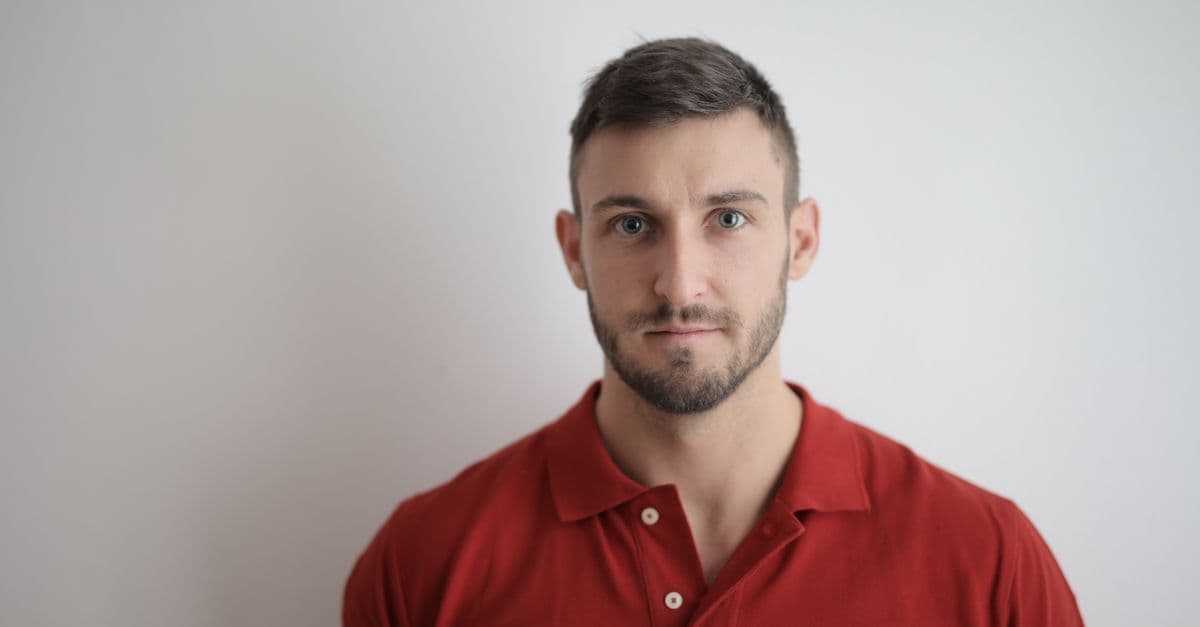
For the print, a photo counter is the simpler route, especially if your centre wants a date or a stamp on the back.
A failed upload doesn't stop your application
You don't need a separate checker site: the form tests your photo as you upload it, and its drag and crop tools let you adjust the frame. After several failed uploads, you can still complete the other sections, according to the Toronto consulate's guide, as long as you bring a standard ID photo when you drop off your passport.
A photo can also be flagged after the online review. Log in, open your form with View and read any reminder from the consul. The Vancouver centre's mail service notice lists a non-compliant photo as one example, and the fix is a compliant photo. Toronto's notes for approved applicants tell you to bring whatever the consul's reminder asks for, along with your passport and a photo that meets the rules.
Visa processing leaves time to sort out China mobile data
The Toronto centre's regular service usually takes 4 working days after you hand in your passport, which leaves time to work out how much data your trip needs. China Unicom and China Telecom carry our China plans on the mainland.
A HelloRoam eSIM needs an unlocked phone that supports eSIM. Check your phone model first, then follow the setup steps at home before your flight.
Stopping in Hong Kong or Macao as well? Our Greater China plans cover both regions and the mainland, so you won't need a second eSIM.
Questions travellers ask
Does my child need their own China visa photo?
Yes, when the child has their own passport. The Toronto visa centre says a child applying independently fills out a separate visa application form, and each form takes its own photo. The ministry's sheet gives no separate rules for children, so a baby's photo also needs open eyes and no hands or other people in the frame.
Is a China visa photo the same as a 2x2 photo?
No. A 2 by 2 inch photo is a square, about 51 mm on each side, while China asks for a rectangle 33 mm wide and 48 mm high. Calgary's centre calls its photo "2 inches" and Vancouver's calls it "small 2-inch size", but both pages give the same 48 by 33 mm measurements.
Can I reuse the photo from my last China visa?
Only if it was taken in the last 6 months. The ministry's sheet and the Toronto, Montreal, Calgary and Vancouver centre lists all ask for a photo taken within 6 months, so a photo from a visa issued a year ago is too old, even if it was accepted then.
Sources
- Requirements and Procedures for Chinese Visa Application: Photo Requirements (Embassy of the PRC in Canada)ca.china-embassy.gov.cn
- Photo Requirements (Consulate-General of the PRC in Toronto)toronto.china-consulate.gov.cn
- Guidelines for China Online VISA Application (Consulate-General of the PRC in Toronto)toronto.china-consulate.gov.cn
- Notice on Visa-free Policy for Canada and the UK (Consulate-General of the PRC in Toronto)toronto.china-consulate.gov.cn
- China travel advice and advisories (Government of Canada)travel.gc.ca
- Important Notice (Chinese Visa Application Service Center, Toronto)www.visaforchina.cn
- Important Notes After Receiving the Approval Email (Chinese Visa Application Service Center, Toronto)www.visaforchina.cn
- Tourist (L) visa material list (Chinese Visa Application Service Center, Toronto)www.visaforchina.cn
- Service options (Chinese Visa Application Service Center, Toronto)www.visaforchina.cn
- Does a child need to fill out a visa application form as well? (Chinese Visa Application Service Center, Toronto)www.visaforchina.cn
- Tourist (L) visa material list (Chinese Visa Application Service Center, Ottawa)www.visaforchina.cn
- Important Notice (Chinese Visa Application Service Center, Ottawa)www.visaforchina.cn
- Procedure of Online Verification Mode for Chinese Visa Applications (Chinese Visa Application Service Center, Montreal)www.visaforchina.cn
- Chinese Visa Online Application System processing steps (Chinese Visa Application Service Center, Calgary)www.visaforchina.cn
- Tourist (L) visa material list (Chinese Visa Application Service Center, Calgary)www.visaforchina.cn
- Two-Way Mailing Service (Chinese Visa Application Service Center, Calgary)www.visaforchina.cn
- Passport Submission and Collection (Chinese Visa Application Service Center, Vancouver)www.visaforchina.cn
- Two-Way Mailing Service (Chinese Visa Application Service Center, Vancouver)www.visaforchina.cn
- Consular Jurisdiction of the Embassy and Consulates-General of the PRC in Canadatoronto.china-consulate.gov.cn
- Passport photos (Immigration, Refugees and Citizenship Canada)www.canada.ca
- Crop, resize, or rotate an image in Preview on Mac (Apple Support)support.apple.com
- Convert image file types using Preview on Mac (Apple Support)support.apple.com
Written by
HelloRoam Team
The HelloRoam Team writes our guides on trip planning, visas and eSIMs. For every new or updated guide, we check each fact at its source. Sources include government, park and weather service pages. We note the date we read each one. A second review then checks every fact against its source before the guide goes live. If we cannot confirm a fact, we leave it out. We link those sources inside the guide, so you can check them.