
HelloRoam sells data-only travel eSIMs for 185 destinations, so on a trip your blue bubbles can run on prepaid data while iMessage stays on your US number.
Every Apple, AT&T, Verizon and T-Mobile figure below, and what we say about our own plans, comes from pages we read on October 30, 2026. Carriers change their rates, so check yours before you fly.
iMessages use Wi-Fi or cellular data, not your texting allowance
Apple's rule is short. If Wi-Fi isn't available, iMessages go over cellular data, and cellular data rates might apply. Those messages stay out of the SMS, MMS and RCS allowances in your cellular plan, according to Apple's iMessage overview. On a cellular connection, then, the only thing an iMessage spends is data.
The bubble shows which path a message took. A blue bubble is an iMessage, and those only go to other Apple devices. A green bubble is SMS, MMS or RCS, which is what your friends on Android get, and your carrier handles it. The send arrow turns the same color first, so you can see which one you're about to use.
| Message type | Bubble | Connection it needs | What it draws on |
|---|---|---|---|
| iMessage | Blue | Wi-Fi or cellular data | Data only, never your SMS, MMS or RCS allowance |
| RCS | Green | Wi-Fi or cellular data | Data. You also need a text plan from a carrier that supports RCS |
| SMS | Green | Cellular signal, or Wi-Fi with Wi-Fi Calling on | Your text plan |
| MMS | Green | Cellular data or Wi-Fi | Your text plan |
Green doesn't always mean SMS anymore. Apple's carrier list shows encrypted RCS, in beta, on AT&T, T-Mobile and Verizon. AT&T says each RCS message counts as data and is charged as data. Verizon says RCS doesn't count against your texting plan, that data charges may apply, and that it works on roaming networks if you have an internet connection. AT&T adds that RCS may not work in all overseas destinations. So budget for an RCS text the way you would for an iMessage.
How much data iMessages use: kilobytes for a text, far more for video
A plain text barely registers. Apple's Platform Security guide caps each message its push service relays at 4 or 16 KB, depending on the iOS version. Your iPhone sends a separate encrypted copy to each of the other person's Apple devices. A group chat repeats that for every member. Anything bigger, like a long text or a photo, gets encrypted and uploaded to iCloud, and each of their devices pulls it down from there.
We found no Apple figure for a standard photo or an audio message, so this table sticks to Apple's own figures, plus one planning rate from our calculator.
| What you send | Size to plan on | Where the number comes from |
|---|---|---|
| A plain text | Up to 4 or 16 KB for each device it goes to | Apple's security guide |
| An hour of text chat and email | About 3.3 MB | Our data calculator, a planning rate as of October 2026 |
| A one-minute video file at the default 1080p | About 70 to 105 MB | Apple's video size guide |
| A standard photo | We found no Apple figure, so measure your own | The steps below |
The download from iCloud uses your data too, so a friend's beach clip can eat into your plan before you've replied. Uploads can start early too. Apple says your iPhone may send an attachment to its servers while you're composing, so even a clip you never send can use data.
The menu names in this post come from Apple's current pages, so they can differ on older iOS versions. To get a real number from your own phone, test it at home before the trip:
- Open Settings and tap Cellular.
- Scroll to the bottom and tap Reset Statistics.
- Turn off Wi-Fi and send a typical photo or short video by iMessage.
- Go back to Cellular and scroll to your list of apps. Tap Show All if you need to, then find Messages. The data used appears below each app.
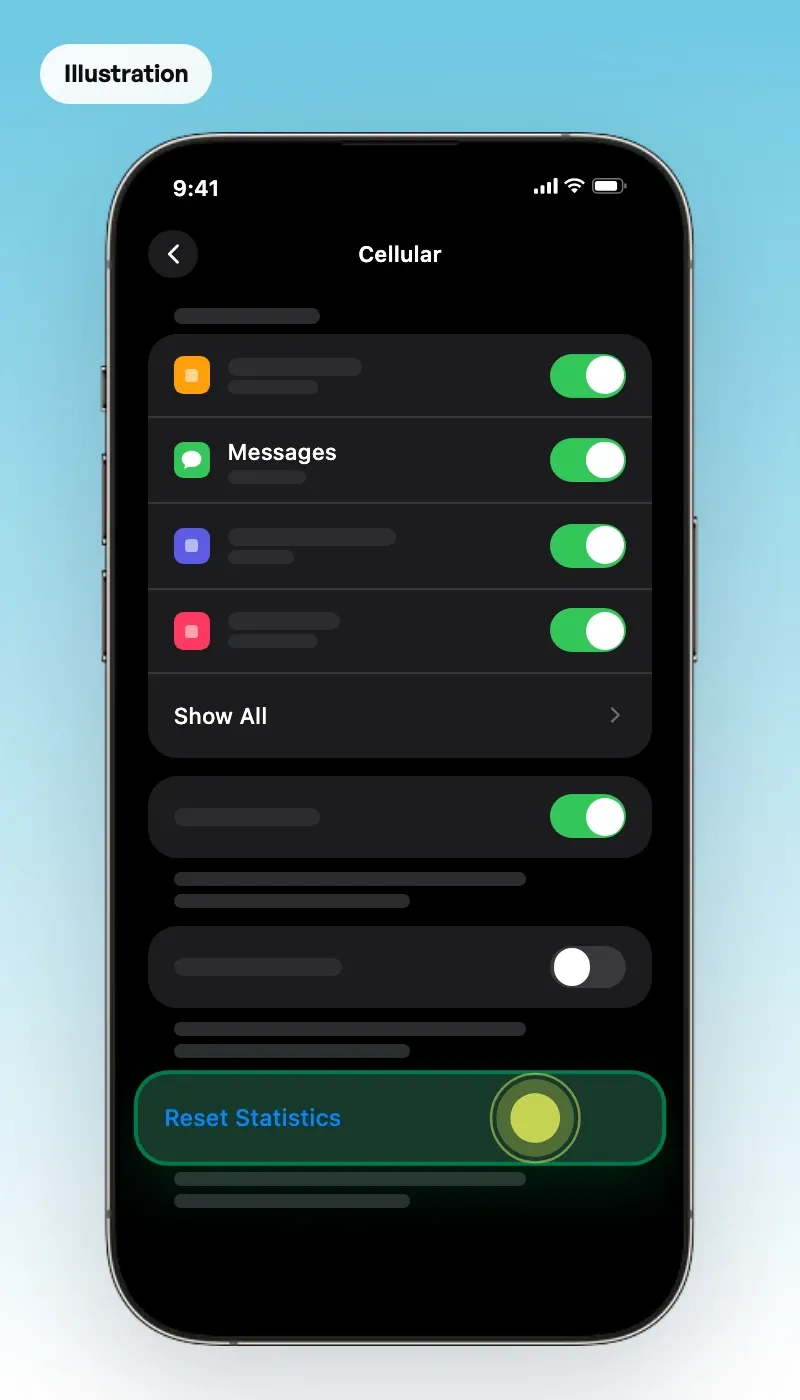
Your carrier still has the official count, so treat this as a guide.
iMessages count as data abroad, so one can start a day pass
Abroad, an iMessage is data, not a text, and that decides what you pay. AT&T says so in writing. Its International Day Pass terms say unlimited text "does not cover other messaging services or applications like iMessage." Its RCS notes say each message sent via RCS or iMessage "counts as data and is charged as data." Our guide to the AT&T Day Pass covers the fee rules plan by plan.
Each carrier bills that data its own way, as our explainer on how US carriers bill data roaming shows. Here's how the main options treat a blue bubble and a green text:
| Plan or option | An iMessage on roaming data | A green SMS you send |
|---|---|---|
| AT&T International Day Pass | Starts a $12, 24-hour pass, plus $6 for each extra line used that calendar day | Starts the same pass |
| AT&T pay-per-use | $2.05 per MB | $1 per text on AT&T's rates page, $0.50 in its Day Pass terms |
| Verizon TravelPass | Starts a 24-hour session at $12 a line, plus taxes and fees | Starts the same session |
| Verizon Pay as You Go | $2.05 per MB | $0.50 per text |
| Verizon Unlimited Ultimate | Comes from 15 GB of high-speed data a month, then 1.5 Mbps | Included |
| T-Mobile Experience Beyond | Comes from 15GB of high-speed data, then up to 256 Kbps | Included |
| T-Mobile Experience More | Comes from 5GB of high-speed data, then up to 256 Kbps | Included |
| T-Mobile Essentials | Needs an International Pass, such as $10 for 2GB over 24 hours | Included |
AT&T's Day Pass, Verizon's TravelPass and Unlimited Ultimate cover 210+ countries and destinations, and T-Mobile's plans and passes cover 215+. Our T-Mobile roaming guide has the passes in full.
You don't have to tap send to start a charge. Verizon says background data, such as app refreshes, email syncing and software updates, can start a TravelPass session. Our guide to Verizon TravelPass has the session rules. AT&T says apps running in the background use data and trigger the daily fee. Both carriers can also put the pass on your line for you: Verizon adds TravelPass to Unlimited Plus and Unlimited Welcome lines. And if your plan doesn't include the place you're visiting and you have no other international feature, AT&T adds the Day Pass to your smartphone on arrival and texts you.
Received messages need care too. AT&T says received text messages don't trigger a daily fee, and its text terms cover SMS and MMS. So a bank code sent by SMS won't start a Day Pass, and Verizon's list of TravelPass triggers names a text you send, not one you receive. On Verizon Pay as You Go, a received text costs $0.05. An iMessage reaches you over data, though, and Apple says cellular data rates may apply to iMessages you send and receive.
Mexico and Canada are the big exception. AT&T says every Unlimited plan includes talk, text and data there, and Verizon says roaming there is included with its Simplicity and Unlimited plans. On other Verizon plans, TravelPass costs $6 a day there. T-Mobile's Experience plans include both countries, and Essentials gets data there at up to 128 Kbps.
Planning to stay on Wi-Fi with no pass? AT&T's advice is to put your phone in Airplane Mode and turn on Wi-Fi. Apple says you can still use Wi-Fi in Airplane Mode, so your blue bubbles keep working. An SMS bank code won't reach you there unless Wi-Fi Calling is on. AT&T's terms also say to turn off data roaming and Wi-Fi calling to avoid an unintended Day Pass.
A failed iMessage can turn into a paid text
The setting behind this is Send as Text Message. With it on, your iPhone automatically tries SMS when iMessage isn't available, as Apple's Messages troubleshooting page explains. So if the hotel Wi-Fi drops and you have no data, a text you meant as an iMessage can fall back to SMS. It then goes out green over your US line.
What that costs depends on your carrier. On an AT&T Day Pass or Verizon TravelPass, sending that SMS starts the day's charge. With no pass, you pay the per-text rate in the table above. AT&T's pages give two rates, so ask AT&T which one applies to your line. On plans that include texting abroad, such as T-Mobile's and Verizon Unlimited Ultimate, you can leave the setting on. Our guide to texting internationally on iPhone covers the rest.
On a day pass or pay-per-use rates, turn it off for the trip:
- Open Settings and tap Apps.
- Tap Messages.
- Turn off Send as Text Message.
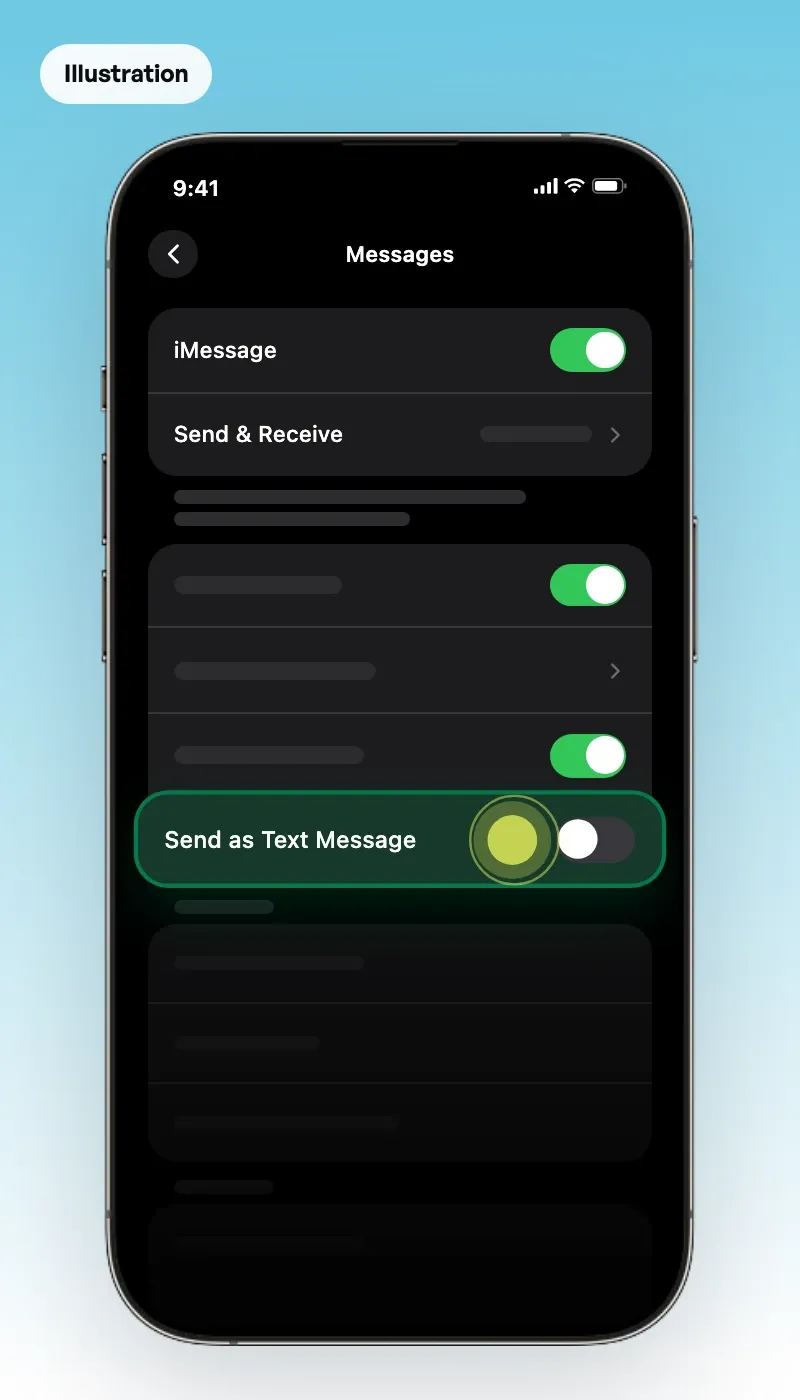
With it off, a message that can't send shows a red exclamation point and Not Delivered. Tap the exclamation point to retry once you're back online. You can also choose Send as Text Message for that one message, though Apple notes messaging rates may apply.
Group MMS chats need the setting on, Apple says, so switch it back when you get home.
A travel eSIM runs iMessage without changing your US number
A travel eSIM gives iMessage its own data and leaves your number alone. Apple's guide to traveling with eSIM says that if you use only the travel eSIM, FaceTime and iMessage keep working on your home line. Keep both lines on and your primary line keeps working too. Friends keep texting the number they already have.
Not set up yet? Here's how to install an eSIM. Then get your lines ready before you fly:
- Open Settings, tap Apps, tap Messages, then tap Send & Receive. Check your US number has a check mark.
- Back in Settings, tap Cellular, then Cellular Data, and choose your travel eSIM. It may not work until you land, so leave this step for the airport if you still need data on the way.
- Leave Allow Cellular Data Switching off, so your iPhone doesn't use data from both plans.
- Back under Cellular, tap your US number, then Cellular Data Options, and turn off Data Roaming on that line only, because each line on an iPhone has its own switch. Then tap your travel eSIM and turn its Data Roaming on, or it won't connect abroad.
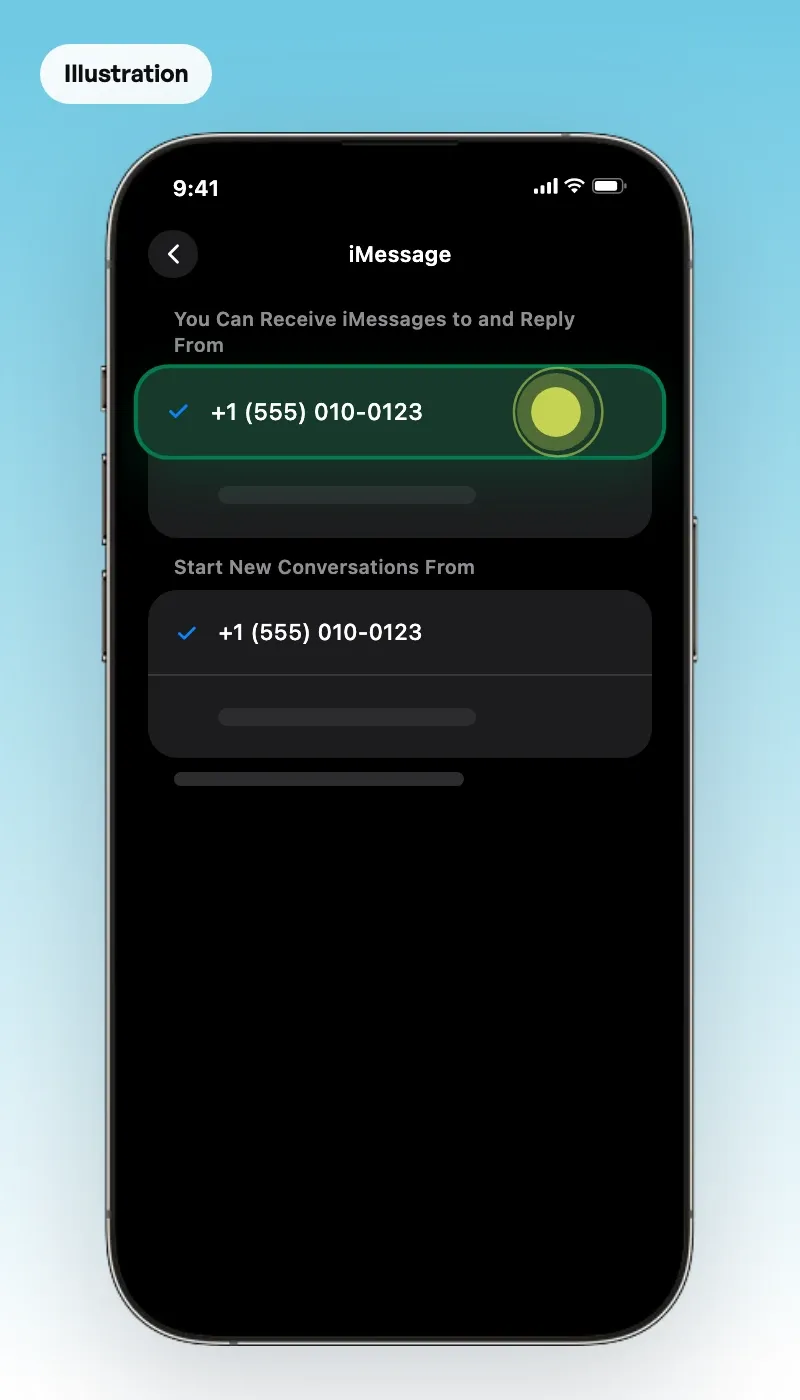
Want texts and bank codes while you're away? Leave your US line on. With iOS 26 and later, if your iPhone offers Turn On Travel eSIM when you land, choose Travel eSIM and Current eSIM. Apple warns that you might still pay roaming fees on your US line, which is another reason to keep Send as Text Message off on a day pass or pay-per-use rates.
HelloRoam plans are prepaid and data only: you pay once, and the plan adds no new number. Before you buy, check if your iPhone supports eSIM. It also has to be unlocked: under Settings, General, About, Apple says No SIM Restrictions next to Carrier Lock means it is. If data won't load once you land, our eSIM troubleshooting help has the fixes.
We sell travel eSIMs, so weigh this advice with that in mind. Our conflict-of-interest rules explain how we handle it. You may not need a plan at all: T-Mobile Experience plans and Verizon Unlimited Ultimate include data abroad, and if hotel Wi-Fi is enough for you, you can skip extra data. Our comparison of eSIM and roaming costs can help you choose.
Turn on iMessage before you fly, because your number needs an SMS
Get iMessage working at home. Apple says an iPhone needs SMS to activate your phone number with iMessage, and your carrier might charge for that SMS. If your iPhone warns you about SMS charges during setup, tap Turn On.
It can also take time. Apple says your carrier can take up to 24 hours to verify your number, and it tells you to check that you can send and receive international SMS. Got a new iPhone for the trip? On iOS 26, Apple says iMessage doesn't activate automatically if you set up an eSIM in Settings later, so turn iMessage off and back on under Apps, then Messages.
Once you're abroad, leave iMessage on unless you have a real problem. If you do need to activate it again, turn your US line back on first. As a backup, you can choose your email address under Send & Receive. Apple warns that using both can split chats with the same person into separate threads.
Photo previews and Low Data Mode cut iMessage data on a trip
Plain texts won't be what empties your plan. Our data usage calculator plans on about 3.3 MB for an hour of text chat and email, and about 1.4 GB for an hour of HD video. It's the attachments that add up, so start with these settings:
- Send Low Quality Photo Previews. Find it under Settings, Apps, Messages. Apple's pages also call it Send Photo Previews or Low Quality Image Mode. By itself, it sends a smaller preview first, then the full-resolution image.
- Low Data Mode. With this on too, Apple says only the preview goes out. It also pauses automatic updates and background tasks when you're off Wi-Fi. On a two-line iPhone, turn it on under the line that carries your data.
- Wi-Fi only for Messages. Turn off cellular data for Messages in the app list under Cellular. Apple says an app with cellular data off uses only Wi-Fi. Keep Send as Text Message off too, or a blocked iMessage can go out as a paid SMS.
- Big videos on Wi-Fi. A one-minute clip is the largest number in the size table above, so send it from the hotel.
Set these up at home, and iMessage shouldn't be what surprises you on your bill. Streaming video and video calls use far more, as our breakdown of how long 1GB of data lasts shows.
Questions travelers ask
Are iPhone to iPhone messages free?
iMessages carry no per-text charge from your carrier, because they travel as data and don't use your SMS allowance. You pay for the connection instead. On cellular, data rates may apply, and abroad that data can start a day pass. If one goes green as an SMS, your text plan or roaming rate applies.
How do you send messages without data?
Use Wi-Fi for iMessage, or send a green SMS, which needs a cellular signal rather than data. With Wi-Fi Calling on, SMS can go over Wi-Fi, though AT&T counts those texts the same as regular ones. With no cellular or Wi-Fi coverage at all, an iPhone 14 or later on iOS 18 or later can use Messages via satellite outdoors. Apple lists it for the US, Canada, Mexico and Japan, free for two years after activation. SMS via satellite depends on your carrier, and carrier fees may apply.
Can someone read your iMessages if you're on their Wi-Fi?
No. Apple encrypts iMessage conversations end to end, so they can't be read while they're sent between devices, and that includes on a hotel or cafe network. Green SMS and MMS texts don't get that protection. Look for Encrypted and a lock icon at the top of the chat.
Sources
- iMessage overview (Apple iPhone User Guide)support.apple.com
- What is the difference between iMessage, RCS, and SMS/MMS? (Apple Support)support.apple.com
- If you can't send or receive messages on your iPhone or iPad (Apple Support)support.apple.com
- How iMessage sends and receives messages securely (Apple Platform Security)support.apple.com
- Take and edit photos or videos in Messages on iPhone (Apple iPhone User Guide)support.apple.com
- Compress a video on iPhone (Apple Support)support.apple.com
- Use cellular data on your iPhone or iPad (Apple Support)support.apple.com
- View or change cellular data settings on iPhone (Apple iPhone User Guide)support.apple.com
- Use eSIM while traveling internationally with your iPhone (Apple Support)support.apple.com
- Using Dual SIM with an eSIM (Apple Support)support.apple.com
- About cellular data roaming options for your iPhone and iPad (Apple Support)support.apple.com
- If you can't turn on or sign in to iMessage or FaceTime on your iPhone (Apple Support)support.apple.com
- Use Low Data Mode on your iPhone and iPad (Apple Support)support.apple.com
- Wireless carrier support and features for iPhone in the United States and Canada (Apple Support)support.apple.com
- About Messages via satellite on your iPhone (Apple Support)support.apple.com
- Use Airplane Mode on your iPhone, iPad, Apple Watch, and Apple Vision Pro (Apple Support)support.apple.com
- Terms & Conditions: AT&T International Day Pass (AT&T)www.att.com
- Get details about AT&T International Day Pass (AT&T Wireless Support)www.att.com
- International pay-per-use rates (AT&T)www.att.com
- Set Up RCS Messaging on iPhone (AT&T Wireless Support)www.att.com
- Verizon TravelPass FAQs (Verizon Support)www.verizon.com
- TravelPass (Verizon)www.verizon.com
- Pay as You Go international rates (Verizon)www.verizon.com
- myPlan unlimited plans (Verizon)www.verizon.com
- Verizon RCS messaging service FAQs (Verizon Support)www.verizon.com
- International Plans: Traveling Abroad without Roaming Fees (T-Mobile)www.t-mobile.com
- International Pass: Add Unlimited Calling & International Data (T-Mobile)www.t-mobile.com
- Coverage in Mexico & Canada (T-Mobile)www.t-mobile.com
- Stay connected with Wi-Fi Calling (AT&T Wireless Support)www.att.com
Written by
HelloRoam Team
The HelloRoam Team writes our guides on trip planning, visas and eSIMs. For every new or updated guide, we check each fact at its source. Sources include government, park and weather service pages. We note the date we read each one. A second review then checks every fact against its source before the guide goes live. If we cannot confirm a fact, we leave it out. We link those sources inside the guide, so you can check them.