
Setting up early won't cost you any days with a HelloRoam Mexico eSIM, because its clock doesn't start until it first connects in Mexico. Your maps and ride apps can then work as soon as you land and switch the line on.
We read every Apple, Telcel, US carrier and Mexican regulator page behind this guide on October 31, 2026.
A Mexico eSIM needs an unlocked iPhone XS, XR or newer
Apple lists eSIM on the iPhone XS, XS Max, XR and later. The iPhone X, iPhone 8 and older models have no eSIM, so they can't add a Mexico eSIM. Our model-by-model eSIM phone list covers the rest.
 Get your Mexico eSIM before you flyInstall it at home, then turn on data roaming for it when you land. From $3.37.See Mexico plans
Next, open Settings, tap General, then tap About. "No SIM restrictions" next to Carrier Lock means your iPhone is unlocked. If it's locked, only your carrier can unlock it, and Apple says that can take a few days. Ask well before your flight.
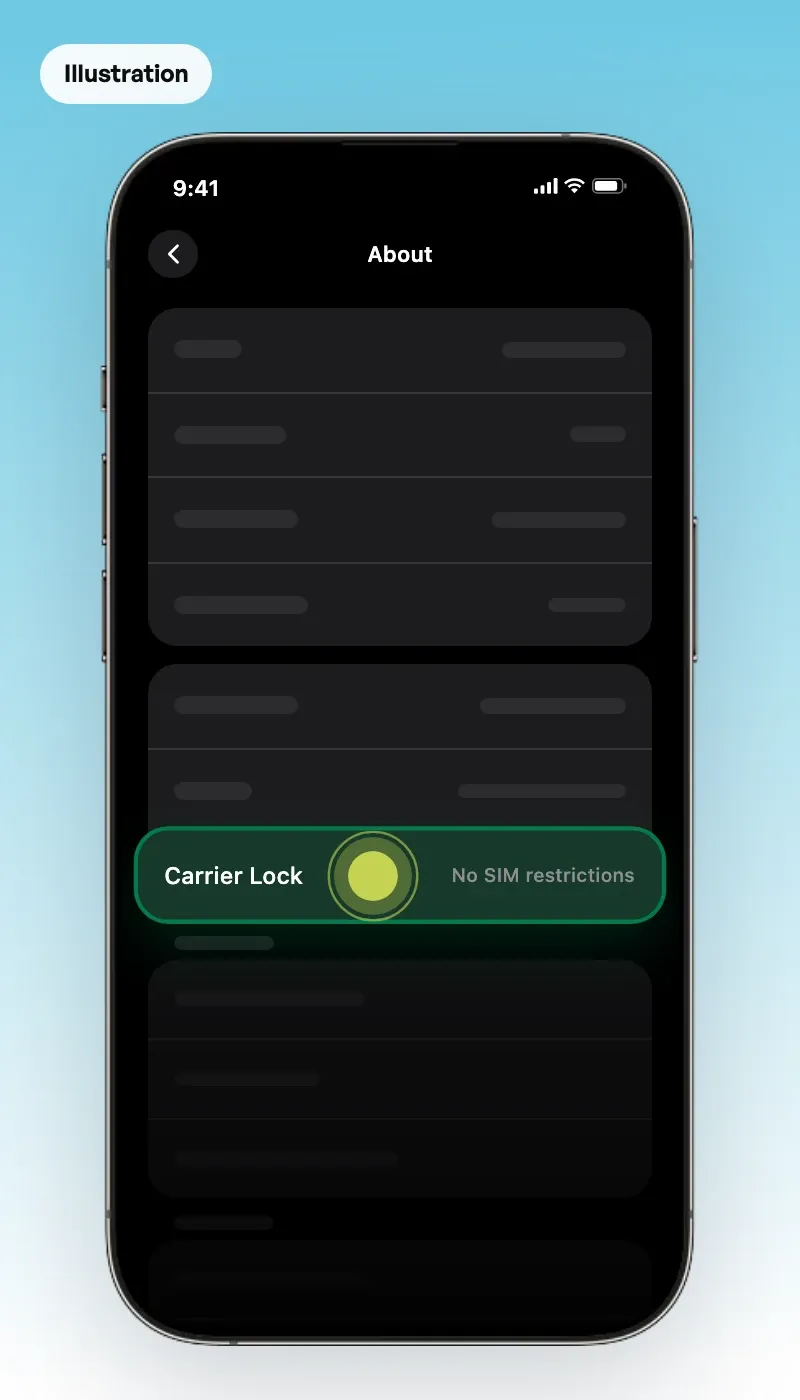
Your model decides how your US number and the Mexico line run side by side. This table follows Apple's specs for iPhones bought in the US.
| US iPhone | SIM types | Where your US number sits | Apple lists 5G in Mexico |
|---|---|---|---|
| XS, XS Max, XR, 11, 11 Pro, 11 Pro Max | Nano-SIM and eSIM | Nano-SIM | No |
| 12, 12 mini, 12 Pro, 12 Pro Max | Nano-SIM and eSIM | Nano-SIM | Yes |
| 13, 13 mini, 13 Pro, 13 Pro Max, SE (3rd generation) | Nano-SIM and eSIM, or two eSIMs | Nano-SIM or a second eSIM | Yes |
| 14 and later, including Air and Duo | Two eSIMs, no SIM tray | A second eSIM | Yes |
Watch for one trap. iPhones before the 13 can't run two eSIMs at once. If your US carrier already moved your number to an eSIM on one of those phones, the Mexico line can't run beside it. Ask your carrier if it can move your number to a physical SIM.
The iPhone SE (2nd generation) isn't in the table because Apple's own pages disagree. Its spec sheet lists a nano-SIM and an eSIM, while Apple's SIM type list files it under nano-SIM only. Check with Apple Support before you buy for that phone.
The networks line up with these phones too. Apple's carrier table lists eSIM and 5G for Telcel, AT&T and Movistar in Mexico. Our guide to Mexico phone carriers shows who runs which network. Telcel's visitor page names LTE Band 4, and every US model above lists that band. Bought your iPhone outside the US? Look up your model in Apple's band list for current iPhones.
Pick a Mexico plan or a North America plan before you install
HelloRoam's Mexico plans list Movistar on 5G and Telcel on 4G, and they carry data only. We read our plan catalog on November 18, 2026. Networks can change, so check the plan page before you buy.
Driving on to the US or Canada? A North America eSIM covers all three countries on one plan. That same catalog listed Movistar on 4G as its network in Mexico, so the Mexico plan is the one that listed 5G there.
The two plans start differently as well. A Mexico plan's days start at its first connection in Mexico. A North America plan covers the US too, so a US network can start its days. Keep that line off until your trip starts.
Add the Mexico eSIM at home, not at the airport
Apple says your iPhone needs a Wi-Fi network or hotspot for this step, and you may land with no data at all. So do it on home Wi-Fi before you leave. With our plans, installing at home doesn't count as the first connection. What you tap depends on how the plan reached you:
| What you have | What to do |
|---|---|
| QR code on another screen | Open the Camera app and scan it. Tap Cellular Plan Detected, tap Continue, then tap Add Cellular Plan. |
| QR code on this iPhone | On iOS 17.4 or later, tap and hold the code in your email, tap Add eSIM, then follow the same prompts. |
| Setup link | On iOS 17.4 or later, tap the link, tap Allow on the Activate New eSIM notification, then tap Continue. |
| Details to paste in | Open Settings, tap Cellular, tap Add eSIM, tap Use QR Code, tap Enter Details Manually, then paste each code. If you see Add Cellular Plan instead, tap that, then Enter Details Manually. |
If iOS 26 asks where you'll use the eSIM, pick Abroad and then the data-only plan. Then open Settings, tap Cellular, tap the new line, tap Cellular Plan Label and name it Mexico. Keep your US line as the Default Voice Line, so calls stay on your own number.
Leave the new line in place after that. If you delete one of our eSIMs after it has connected, it's gone for good. Our iPhone eSIM setup walkthrough shows each screen. Your travel partner has a Galaxy or Pixel? Our general eSIM install guide covers those phones.
Switch to the Mexico line after you land

Screenshot these steps before you fly, because you may land with no data:
- Open Settings, tap Cellular, then tap your Mexico line under SIMs.
- Switch on Turn On This Line.
- Go back, tap Cellular Data and pick the Mexico line.
- Tap the Mexico line again and turn on Data Roaming. If you don't see it there, tap Cellular Data Options first.
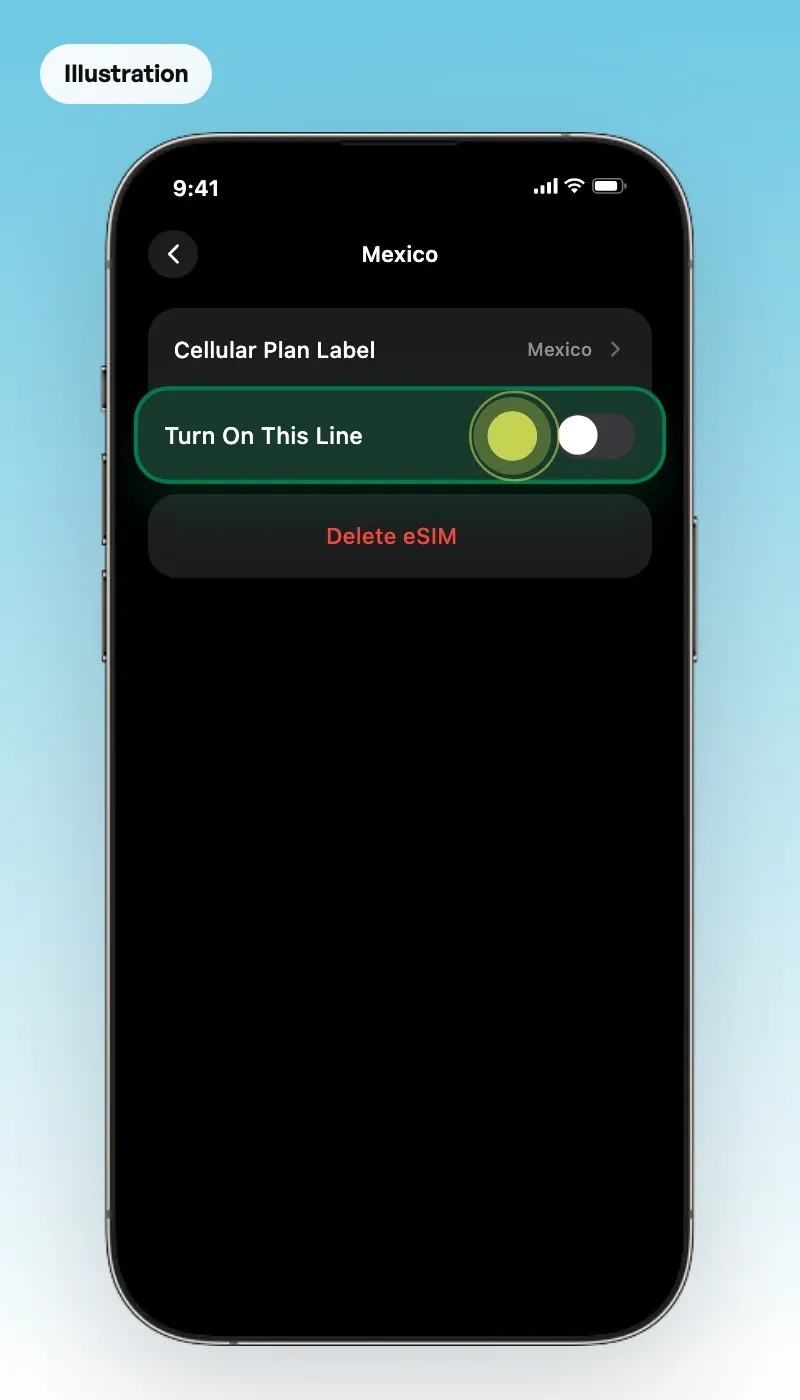
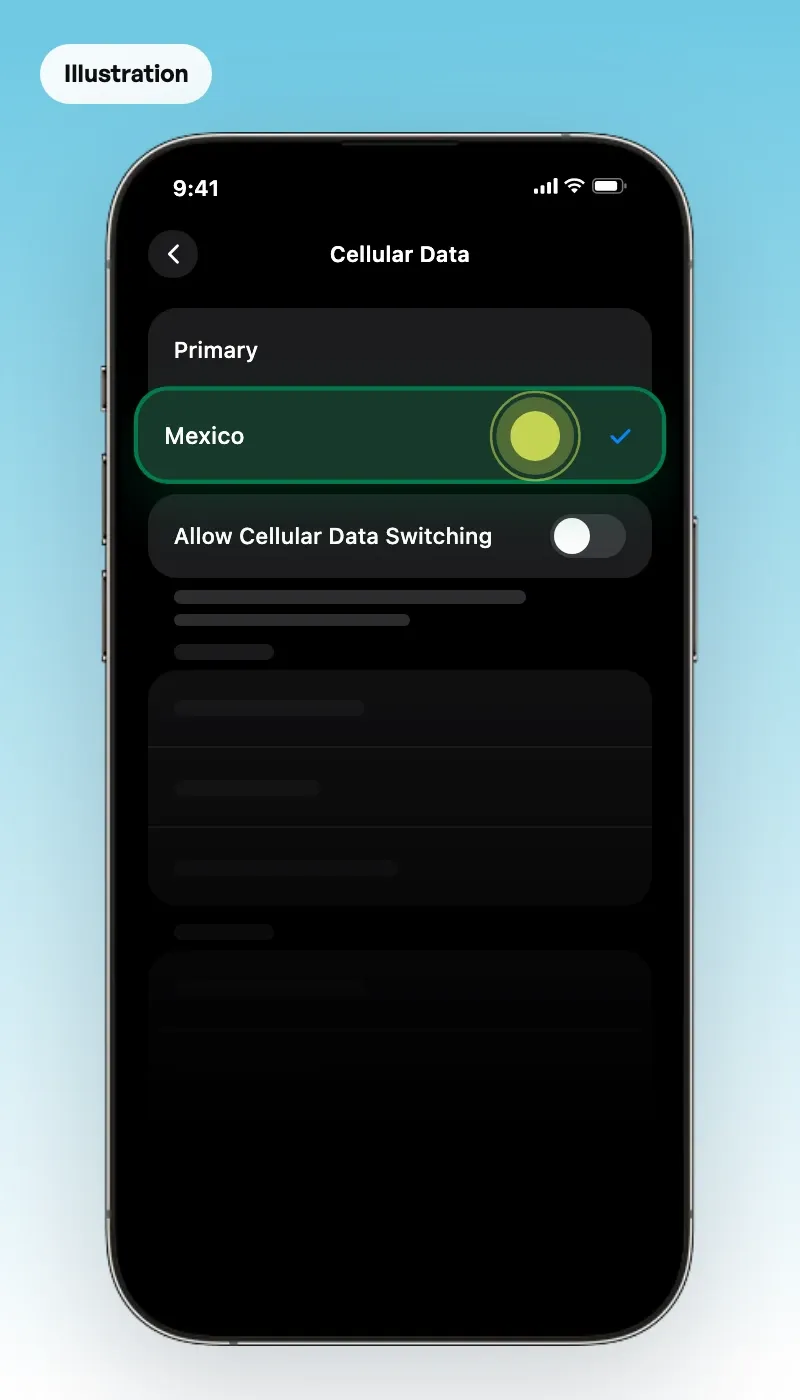
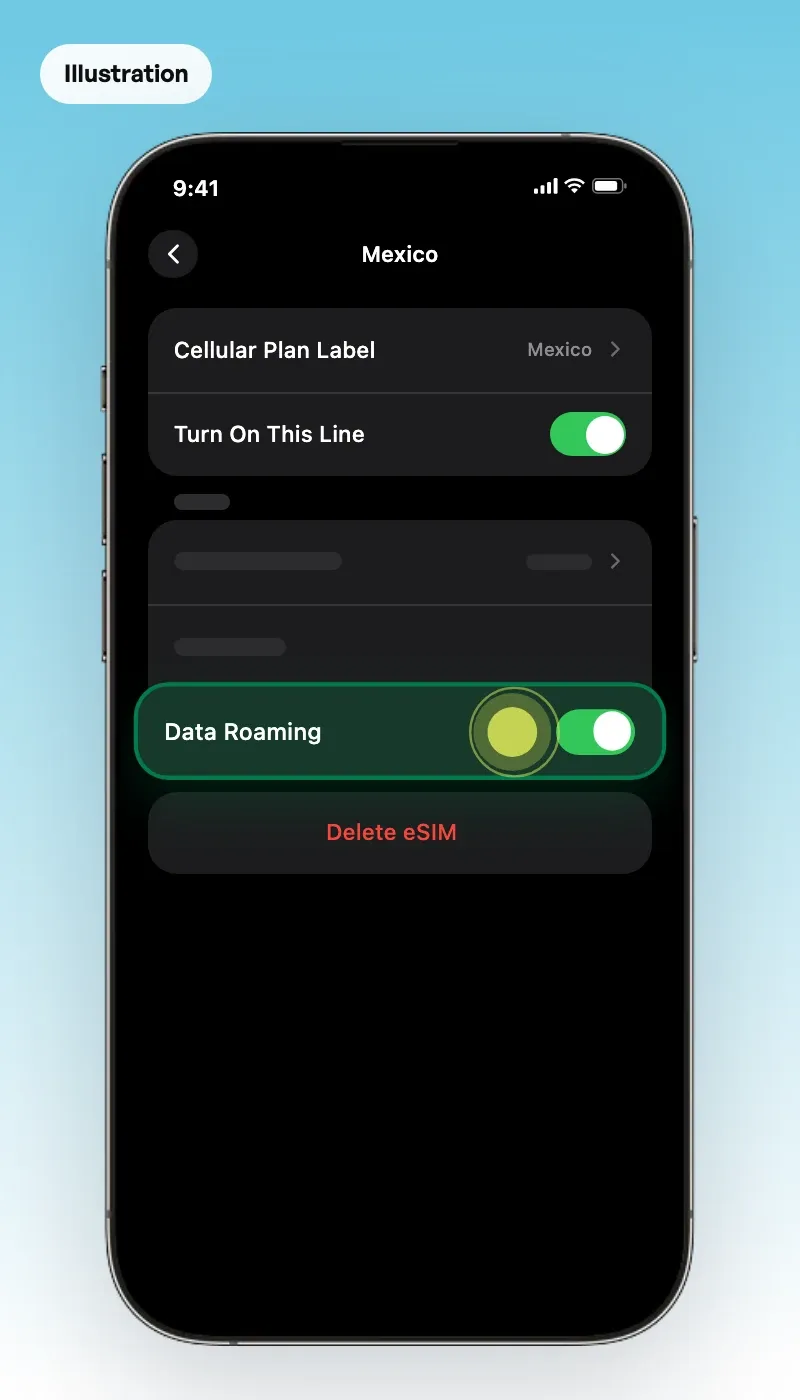
Leave Allow Cellular Data Switching off, since that setting lets your iPhone use data from both plans. Now look for at least one signal bar, then open Maps to check that data loads.
On iOS 26 you may get a Turn On Travel eSIM notification instead. Tap it and choose Travel eSIM and Current eSIM to keep both lines on, with the travel eSIM handling data. Apple warns your home line might still bring roaming fees. Travel eSIM Only leaves your home line off, though Apple says FaceTime and iMessage keep working on it. Your iPhone then asks about Low Data Mode, so pick that or Not Now.
Back in the US, iOS 26 may switch you over by itself, depending on your country or region. If it doesn't, open Settings, tap Cellular, check that your US line is on, and turn the Mexico line off.
Your US plan decides what to do with your home line in Mexico
Many US plans already include Mexico, so check yours before you pay for anything:
- AT&T: any unlimited plan includes talk, text and data in Mexico, though AT&T warns speeds can drop as low as 2G. AT&T Prepaid depends on the plan's price, so check yours.
- T-Mobile: Canada & Mexico included comes with plans such as Experience More, Go5G and Magenta. Most plans get 5GB, 10GB, 15GB or 30GB of high-speed data, then up to 256 or 128 Kbps. See what each T-Mobile plan gets in Mexico before you buy anything.
- Verizon: all its Unlimited plans include talk, text and data in Mexico, and its plan details drop international data to 3G speeds after the first 2 GB a day. Unlimited Ultimate also lists 15 GB a month of high-speed international data, so ask Verizon which limit applies in Mexico.
If your plan covers Mexico and that data fits your trip, you may not need an eSIM at all. A travel eSIM earns its place when fast data runs short or your plan leaves Mexico out. If fast data is the issue, your US line can stay as it is.
If your plan leaves Mexico out, your US line can still cost you. On a postpaid plan, AT&T adds its International Day Pass on its own if your line has no other international feature. The pass is $12 a day and begins the first time you use data, send a text, or make or accept a call. Verizon's TravelPass is $6 a day in Mexico, plus taxes and fees, and a postpaid line without it pays Pay as You Go rates. On Verizon Prepaid, TravelPass is already on the line, and Verizon says a line without it can't be used while roaming. So tap your US line and turn off Data Roaming for that line only. If you don't see it there, tap Cellular Data Options first. Background data then can't start a pass, but a call you make or answer, or a text you send, still can. Our explainer on how US carriers charge for roaming has the wider picture.
Either way, keep your US line on if you expect bank codes. Our plans carry data only, so those texts still go to your US number. AT&T says texts you receive don't trigger its daily fee, and Verizon's TravelPass page doesn't list them as a trigger. We sell travel eSIMs, and our editorial policy explains that conflict. If your plan already covers the trip, keep your money.
A Mexican eSIM from Telcel installs in the opposite order
Telcel sells a Tourist eSIM, a prepaid Mexican line for visitors, and its steps run the other way around:
- Install it after you arrive, on Wi-Fi. Its days start once it's on your phone, so an early install burns them.
- Register the line in your name before you use it. Telcel's process captures your passport with your camera and runs a liveness check.
- Your iPhone has to be unlocked, same as with any other carrier's eSIM.
That passport step comes from a new rule. Since January 9, 2026, Mexico has required new mobile lines to be tied to a person or company, and older prepaid lines have deadlines that run to December 31, 2026. Mexico's telecom regulator, the Comisión Reguladora de Telecomunicaciones (CRT), says any eSIM from a company operating in Mexico falls under the same rule.
Roaming lines are a separate case. Mexico's registration rules leave them for the CRT to define after the 2026 World Cup, and we found no such mechanism in its notices through October 30, 2026. So a travel eSIM roaming on Mexican networks isn't required to register yet. Check the CRT's notices before you go, since that can change.
Telcel's terms also suggest deleting an eSIM profile if you already hold two or more. Don't delete your US line to make room, because Apple says an iPhone can manage eight or more eSIMs.
Moving to Mexico for months? In an October 6, 2026 notice, the CRT says foreign eSIMs aren't a substitute for a Mexican line, and that international agreements bar permanent roaming. A registered Mexican line fits that stay better.
Try these fixes for No Service or SOS in Mexico
Work through these in order:
- Open Settings, tap Cellular, tap the Mexico line and check that Turn On This Line and Data Roaming are both on. If you don't see Data Roaming there, tap Cellular Data Options.
- Check that the Mexico line is picked under Cellular Data.
- Turn on Airplane Mode for about 30 seconds, then turn it off so your iPhone can choose a network.
- Open Settings, tap General, tap Date & Time and make sure Set Automatically is on.
- Restart your iPhone once. If that fails, tap the line, tap Network Selection, turn Automatic off and try a network your plan lists. Turn Automatic back on when you finish.
Don't delete the eSIM or edit APN settings while you troubleshoot. If it still won't connect, our eSIM troubleshooting help starts from what your screen shows, and our support team answers on WhatsApp and email 24/7 in your language.
Heading somewhere remote? Look up your route on the CRT's Mapa de Conectividad, which shows mobile coverage by operator and was last updated July 16, 2026. With no cell or Wi-Fi coverage at all, an iPhone 14 or later on iOS 18.4 or later can use Emergency SOS via satellite in Mexico, and Messages via satellite if you turn on iMessage before you lose coverage. Both need you outside with a clear view of the sky and horizon. Apple says each is free for two years after the iPhone's activation. For an emergency, Apple says to call or text 911.
Questions travelers ask
Can I use my US iPhone in Mexico?
Yes. If your US plan includes Mexico, your iPhone roams on it when you land. If it doesn't, a carrier-unlocked XS, XR or newer can add a Mexico eSIM. Apple's carrier table lists Telcel, AT&T and Movistar in Mexico, with 5G on the iPhone 12 and later.
Do I turn off my primary line when using an eSIM?
No, you don't have to. Keep your US line on if you want your own number for calls and bank texts, and pick the Mexico line for data. Apple warns your home line might still bring roaming fees, so check your plan first. If you do turn it off, Apple says FaceTime and iMessage keep working.
Can I buy a phone in the US and use it in Mexico?
Yes. It can roam on a US plan that includes Mexico, and it has to be carrier-unlocked to take a Mexican plan. US iPhones from the XS on list the LTE band Telcel names for visitors, and Apple lists 5G for Telcel, AT&T and Movistar in Mexico. US iPhones from the 14 on take eSIM only, so a Mexican plan has to go on as an eSIM.
Sources
- Set up eSIM on iPhone (Apple Support, published October 22, 2026)support.apple.com
- Use eSIM while traveling internationally with your iPhone (Apple Support, published October 22, 2026)support.apple.com
- Learn which type SIM your iPhone or iPad uses (Apple Support, published October 22, 2026)support.apple.com
- How to unlock your iPhone for use with a different carrier (Apple Support)support.apple.com
- Using Dual SIM with an eSIM (Apple Support)support.apple.com
- About cellular data roaming options for your iPhone and iPad (Apple Support)support.apple.com
- Wireless carrier support and features for iPhone in Latin America and the Caribbean (Apple Support, published May 11, 2026)support.apple.com
- Find wireless carriers and worldwide service providers that offer eSIM (Apple Support)support.apple.com
- If you see SOS, No Service, or Searching on your iPhone or iPad (Apple Support)support.apple.com
- iPhone: supported 5G and LTE networks (Apple)www.apple.com
- iPhone XS technical specifications (Apple Support)support.apple.com
- iPhone XR technical specifications (Apple Support)support.apple.com
- iPhone 12 technical specifications (Apple Support)support.apple.com
- iPhone 13 technical specifications (Apple Support)support.apple.com
- iPhone SE (2nd generation) technical specifications (Apple Support)support.apple.com
- iPhone SE (3rd generation) technical specifications (Apple Support)support.apple.com
- iPhone 14 technical specifications (Apple Support)support.apple.com
- About Messages via satellite on your iPhone (Apple Support, published May 15, 2026)support.apple.com
- Use Emergency SOS via satellite on your iPhone (Apple Support)support.apple.com
- Tourist eSIM: plans and terms (Telcel)www.telcel.com
- Travel to Mexico: before you leave (Telcel)www.telcel.com
- Mexico Unlimited Data Plan (AT&T)www.att.com
- AT&T International Day Pass (AT&T)www.att.com
- AT&T International Day Pass destinations (AT&T Wireless Support)www.att.com
- Canada & Mexico included (T-Mobile Support)www.t-mobile.com
- Important Plan Information (Verizon)www.verizon.com
- International Plans: TravelPass (Verizon)www.verizon.com
- La CRT aprueba y emite los Lineamientos para la identificación de líneas telefónicas móviles (CRT, December 8, 2025)www.gob.mx
- Acuerdo: Lineamientos para la identificación de líneas telefónicas móviles (Diario Oficial de la Federación, December 9, 2025)dof.gob.mx
- Tarjeta informativa TI. 06/2026 (CRT, October 6, 2026)www.gob.mx
- Prensa: archivo de comunicados (CRT)www.gob.mx
- Mapa de Conectividad en México (CRT)mapascobertura.crt.gob.mx
- Get details about AT&T International Day Pass (AT&T Wireless Support, updated March 2, 2026)www.att.com
- Terms & Conditions: AT&T International Day Pass (AT&T)www.att.com
- Más de 9.9 millones de líneas con terminación “4” ya están vinculadas (CRT, Bol. 049/2026, October 19, 2026)www.gob.mx
- CRT anuncia calendario y fechas límite para registro de líneas (CRT, Bol. 021/2026, June 25, 2026)www.gob.mx
- Informe de consideraciones sobre la consulta pública de los Lineamientos para la identificación de líneas telefónicas móviles, p. 95 (CRT, 2025)portal.crt.gob.mx
- Prepaid TravelPass FAQs (Verizon Support)www.verizon.com
Written by
HelloRoam Team
The HelloRoam Team writes our guides on trip planning, visas and eSIMs. For every new or updated guide, we check each fact at its source. Sources include government, park and weather service pages. We note the date we read each one. A second review then checks every fact against its source before the guide goes live. If we cannot confirm a fact, we leave it out. We link those sources inside the guide, so you can check them.