
HelloRoam sells travel eSIMs for 185 destinations, so iMessage and WhatsApp can run on trip data while your US number stays on your phone for bank codes.
We read every Apple, AT&T, Verizon and T-Mobile page behind this guide on October 30, 2026.
Text internationally on iPhone in 4 steps
Do step 1 at home, before you fly. The menu names here come from Apple's iOS 27 guide, so they can differ on older versions.
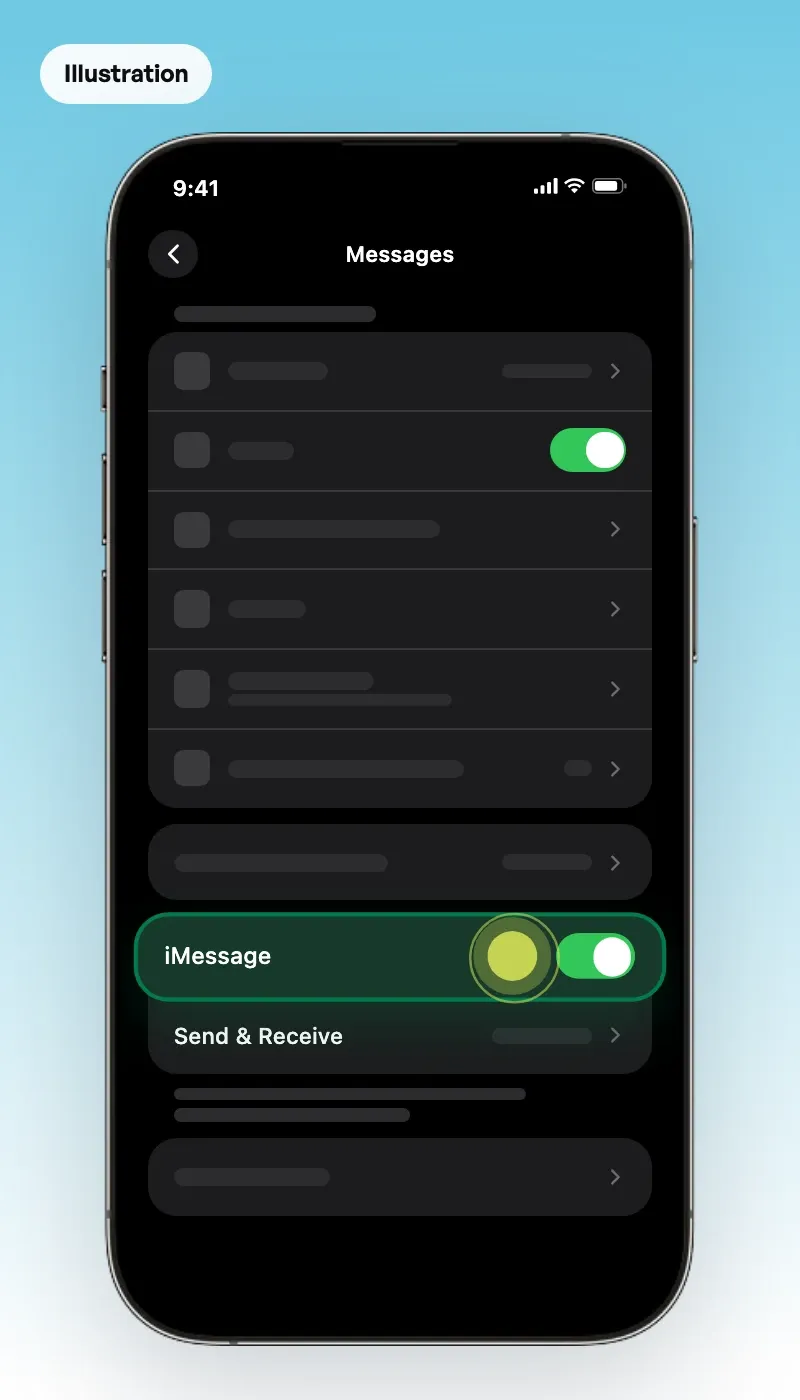
- Turn on iMessage. Open Settings, tap Apps, tap Messages, then turn on iMessage. Apple says activating your phone number needs an SMS, and your carrier might charge for it.
- Start a new message. Open Messages, tap the Compose button, then tap the To field.
- Enter the full number. Type the plus sign, the country code and the local number. You can also enter a contact name or an Apple Account.
- Check the send button, then tap it. Blue means the text goes as iMessage. Green means it goes as SMS, MMS or RCS.
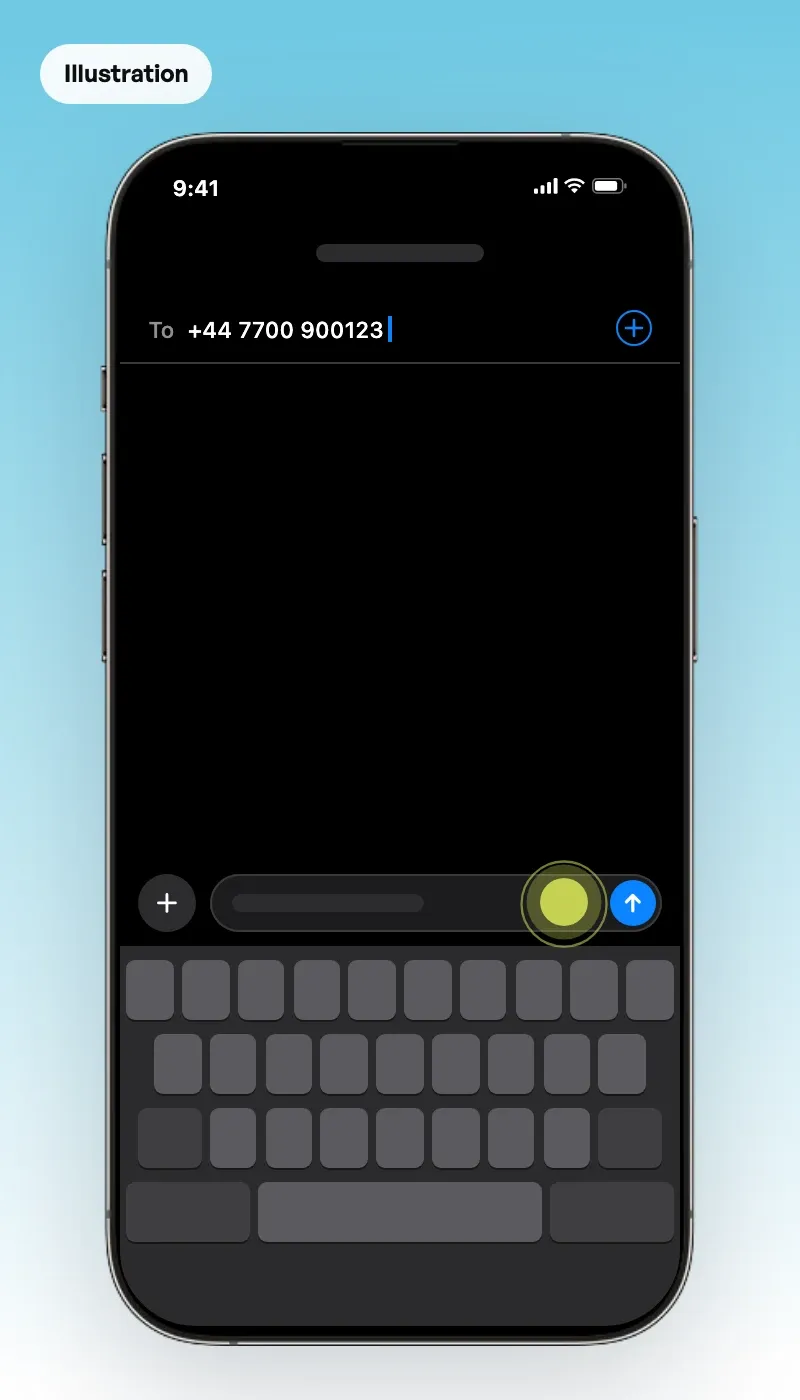
A green button usually means the other person has no Apple device, or iMessage is off or temporarily unavailable on your iPhone or theirs.
RCS and SMS both show green, so read the text field too. AT&T and Verizon both say it reads Text Message followed by RCS or SMS, which tells you which one a green text will use.
International text format: plus sign, country code, no leading zero
T-Mobile's roaming checklist says the plus sign replaces the international dialing code, and that texts work the same way as calls. AT&T gives the same order for calls and texts from the US: press + or 011, then the country code and local number.
- Drop the zero. T-Mobile tells travelers to remove a 0 listed before the city code. A UK mobile written as 07700 900123 becomes +44 7700 900123. That's a sample from the range Ofcom recommends for TV and radio drama.
- Add +1 for numbers back home. When you're abroad, write a US number with +1, the area code and the number, such as +1 555 123 4567. To text you from abroad, AT&T says a sender enters their country's access number, then 1 and your number.
iMessage works internationally, but only between Apple devices
iMessage works internationally because it runs on Wi-Fi or cellular data, not on your carrier's text network. It can't reach an Android phone, though, so a text to an Android friend goes out green. Our guide on whether iMessages use data shows what counts against your plan abroad.
Your choice depends on the other person's phone and on how you're connected.
| Way to text | Reaches | Runs on | What you pay |
|---|---|---|---|
| iMessage (blue) | Other Apple devices | Wi-Fi or cellular data | No text allowance used; cellular data rates may apply |
| RCS (green) | Android phones and iPhones, on supported carriers | Wi-Fi or cellular data | AT&T and Verizon don't count it as a text; data charges may apply |
| SMS and MMS (green) | Apple and non-Apple phones | Your carrier's cellular network | Your plan, a day pass or a per-text rate |
| WhatsApp and Signal | People on the same app | Wi-Fi or cellular data | The apps are free; data charges may apply |
RCS is the green option that can still run on data. You need iOS 18 or later and a carrier that supports RCS on iPhone. To check it, open Settings, tap Apps, tap Messages, then tap RCS Messaging.
Abroad, RCS is less certain. Verizon says its RCS works on roaming networks if you have an internet connection. AT&T says RCS should work over Wi-Fi outside its network, but may not work in all overseas destinations. Apple adds that RCS isn't supported by all carriers or in all countries or regions.
Texting a number abroad from the US is often included
Before a trip, you might text a hotel, a host or a tour guide. AT&T, Verizon and T-Mobile all include that on many plans, but check yours first.
- AT&T says most of its plans include texting from the US to the world. Without that, it charges $0.50 for each text and $0.70 for each picture or video message sent.
- Verizon includes unlimited messaging to and from other countries while you're in the US on its Unlimited data plans and shared data plans.
- T-Mobile includes unlimited texts to any country where texting is available, except Cuba or Wallis & Futuna. That covers eligible plans such as Experience More, Experience Beyond, Go5G and Magenta.
A blue iMessage skips all of this, since it doesn't count against your text plan.
One SMS sent abroad can start a carrier day pass
An SMS goes through your carrier, so your carrier's roaming rules set the cost. On a personal AT&T postpaid plan, you don't have to sign up first. AT&T adds International Day Pass by itself when you use your phone in a destination your plan doesn't include, unless your line has another international feature. It sends a text when it does, and you can opt out then.
Here's what AT&T, Verizon and T-Mobile list for a text sent abroad.
| Carrier | One SMS sent abroad | Daily price | No pass, per text sent | A text you receive |
|---|---|---|---|---|
| AT&T | Starts the daily fee in a Day Pass destination | $12 per 24 hours, $6 for each added line that day | $1 or $0.50, see below | Rated as domestic, no daily fee |
| Verizon | Starts that day's TravelPass charge, once it's on your line | $12 per line per day, $6 in Canada and Mexico, plus taxes and fees | $0.50 | Not a listed TravelPass trigger; $0.05 on Pay as You Go |
| T-Mobile | No charge in 215+ countries and destinations on qualifying plans | No pass needed for texts | That place's rate, confirmed in T-Mobile's welcome text | Part of unlimited texting |
AT&T's own pages disagree on that no-pass rate. Its pay-per-use page lists $1 per text sent, and its Day Pass terms list $0.50. Ask AT&T which one applies to your line. Our breakdown of AT&T Day Pass costs shows what each AT&T plan pays abroad.
Mexico and Canada are the main exception. Every AT&T Unlimited plan includes unlimited talk, text and data there, and Verizon includes roaming there on its Simplicity and Unlimited plans.
Verizon adds TravelPass by itself to Unlimited Plus and Unlimited Welcome lines. Its Unlimited Ultimate plan already includes international data, talk and text. Our Verizon TravelPass guide explains what starts a daily charge and how to avoid it.
T-Mobile is the simplest. Its most popular plans include texting while you travel, and it says Essentials plans get free texting in 215+ countries and destinations too. Our T-Mobile roaming guide shows what each plan adds.
Apps can start the same fee. AT&T warns that apps use data even when you may not be aware, and that this may trigger daily fees. Our explainer on how data roaming charges work covers that side.
These iPhone settings keep texts from starting roaming charges
If your carrier charges for roaming, change these before you land.
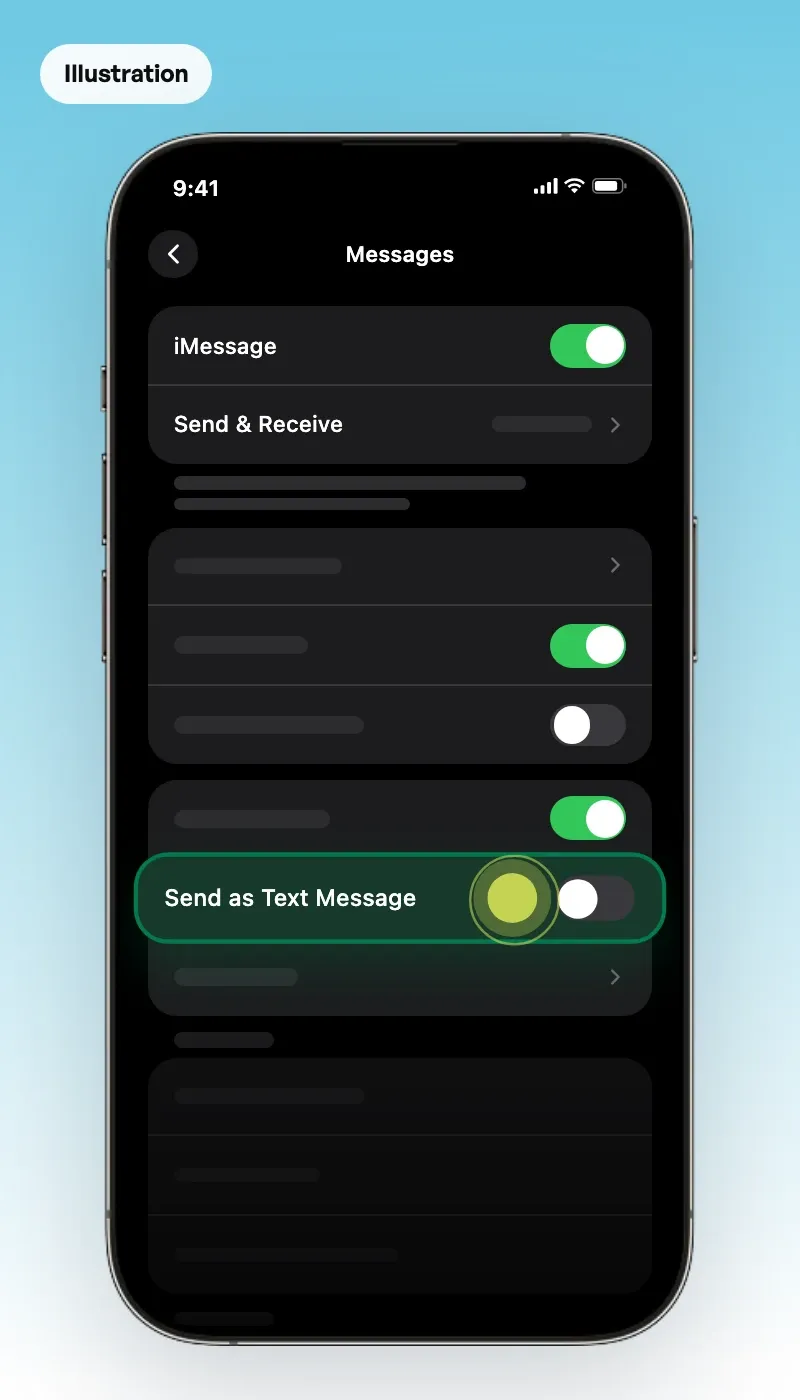
- Send as Text Message. Open Settings, tap Apps, tap Messages, and turn it off. With it on, Messages tries SMS by itself when iMessage isn't available. Older guides may call this Send as SMS. It stops that fallback, not green texts, so a text to an Android phone still goes green. Apple's help page also says group MMS texts need this switch on, so turn it back on when you get home.
- Wi-Fi Calling on AT&T. AT&T says texts sent with Wi-Fi Calling count the same as regular texts, so Wi-Fi alone doesn't make an SMS free. Its Day Pass terms name Wi-Fi Calling as a setting to turn off to avoid unintended use. Open Settings, tap Cellular, choose your AT&T line, then tap Wi-Fi Calling.
- Data Roaming on your US line. Open Settings, tap Cellular, tap your US number, tap Cellular Data Options, then turn off Data Roaming. iPhone sets this per line, so leave it on for a travel eSIM.
Watch the Not Delivered alert too. Tap the red exclamation point, then tap Try Again. The Send as Text Message choice in that menu sends a regular text, and Apple warns that messaging rates may apply.
Don't switch iMessage off and on as a quick fix while you're roaming. Activating your number needs that SMS from step 1, and Apple says your carrier can take up to 24 hours to verify your number. If a spinning gear shows next to your number, Apple says your iPhone is already trying to verify it. There's no need to keep turning iMessage off and on.
Keep your US number on iMessage with a travel eSIM
A travel eSIM gives your iPhone data without using your US plan's roaming. Apple says that if you use a travel eSIM by itself, FaceTime and iMessage keep working on your home line. You need an iPhone XS, XS Max, XR or later that isn't locked to a carrier, and our list of iPhones that support eSIM has the details.
You can find the data plan for your destination on our eSIM for travel page. HelloRoam's plans are data only. As of October 2026, our terms say they don't support voice calls, SMS text messages or emergency calls, so your iMessage and app messages use the eSIM's data. Our terms also say not to rely on a HelloRoam eSIM as your only way to reach emergency services, so keep a voice line for emergencies.
With iOS 26 or later, your iPhone might show Turn On Travel eSIM when you arrive. It then asks which of these setups you want.
| Choice | iMessage on your US number | SMS sent to your US number | Carrier charges |
|---|---|---|---|
| Travel eSIM Only | Keeps working | Can't reach a line that's off | Your US line stays off |
| Travel eSIM and Current eSIM | Keeps working | Arrives on your US line | Apple warns you might still incur roaming fees |
Choose both lines if your bank texts you codes. Then send nothing from that line as SMS, and use iMessage or an app. On AT&T and Verizon, a call you make or answer on it can start the daily charge too.
To pick your data line by hand, open Settings, tap Cellular, tap Cellular Data, then select the travel line. Leave Allow Cellular Data Switching off, because Apple says it lets your iPhone use data from both plans. Next, open Settings, tap Apps, tap Messages, tap Send & Receive, and check that your US number is selected.
Our guide on how to install an eSIM covers the setup at home, and eSIM vs roaming compares the two routes for your trip.
WhatsApp or Signal covers Android friends abroad
A messaging app is the simple answer for anyone without an Apple device. Verizon notes that everyone has to use the same app, and that these apps work inside and outside the US whenever you have an internet connection.
The WhatsApp App Store listing calls it a free messaging and calling app and says data charges may apply. The Signal App Store listing says it uses your phone's data connection, so you avoid SMS and MMS fees.
Need a local number for a driver or host who only takes SMS? A data-only eSIM won't give you one. Apple says many prepaid and postpaid plans from local carriers come with a local phone number, so one of those suits a trip with lots of local texts.
Fix a text that won't send abroad
Work through these in order.
- Check your connection. A blue text needs Wi-Fi or cellular data.
- Retry the text. Tap the red exclamation point, then tap Try Again.
- Reset the network. Turn on Airplane Mode for about 30 seconds, then turn it off and let your iPhone pick a network.
- Check the date and time. Open Settings, tap General, tap Date & Time, and make sure Set Automatically is on.
- Clear No Service or SOS only. Open Settings, tap Cellular, tap the line you use for data, tap Cellular Data Options, and make sure Data Roaming is on. If that's your US line, turning Data Roaming on can start AT&T or Verizon roaming charges.
If your travel eSIM is the problem, our eSIM troubleshooting page covers setup, data and signal fixes.
Questions travelers ask
Is it free to text internationally on iPhone?
It depends on the bubble and where you are. A blue iMessage uses none of your text allowance, though cellular data rates may apply. A green SMS follows your carrier's plan. From the US, many AT&T, Verizon and T-Mobile plans include texts to other countries. Abroad, qualifying T-Mobile plans include texting in 215+ countries and destinations, while AT&T and Verizon charge a daily fee or a per-text rate outside Mexico and Canada unless your plan includes it.
Can I text internationally for free?
Yes, over Wi-Fi with iMessage, WhatsApp or Signal, as long as the other person uses the same service. Many US plans also include texts from the US to other countries. Wi-Fi Calling is different: AT&T counts those texts the same as regular ones.
How do I iMessage someone internationally?
Start a new message and enter their contact name, Apple Account or full number with the plus sign and country code. If the send button is blue, it's going as iMessage. They need an Apple device with iMessage turned on.
Sources
- What is the difference between iMessage, RCS, and SMS/MMS? (Apple Support, published May 11, 2026)support.apple.com
- iMessage overview (iPhone User Guide, iOS 27, Apple Support)support.apple.com
- Send and reply to messages on iPhone (iPhone User Guide, iOS 27, Apple Support)support.apple.com
- Set up Messages on iPhone (iPhone User Guide, iOS 27, Apple Support)support.apple.com
- If you can't send or receive messages on your iPhone or iPad (Apple Support, published June 18, 2026)support.apple.com
- If you can't turn on or sign in to iMessage or FaceTime on your iPhone (Apple Support, published September 14, 2026)support.apple.com
- If your iPhone messages are green (Apple Support, published June 18, 2026)support.apple.com
- Turn on RCS messaging on your iPhone (Apple Support, published May 11, 2026)support.apple.com
- Use eSIM while traveling internationally with your iPhone (Apple Support, published October 22, 2026)support.apple.com
- Using Dual SIM with an eSIM (Apple Support, published October 22, 2026)support.apple.com
- About cellular data roaming options for your iPhone and iPad (Apple Support, published October 22, 2026)support.apple.com
- Make a call with Wi-Fi Calling (Apple Support)support.apple.com
- International roaming checklist (T-Mobile Support)www.t-mobile.com
- International Plans (T-Mobile)www.t-mobile.com
- Unlimited Roaming & SMS Data When You Travel (T-Mobile)www.t-mobile.com
- International talk & text guide, when stateside (T-Mobile Support)www.t-mobile.com
- Call or text other countries from the U.S. (AT&T Support, updated May 6, 2026)www.att.com
- International pay-per-use rates (AT&T)www.att.com
- International Day Pass terms and conditions (AT&T)www.att.com
- Stay connected with Wi-Fi Calling (AT&T Support)www.att.com
- Set up RCS Messaging on iPhone (AT&T Support)www.att.com
- International Plans: Pay As You Go (Verizon)www.verizon.com
- International Plans: TravelPass (Verizon)www.verizon.com
- International Travel FAQs (Verizon Support)www.verizon.com
- Verizon RCS messaging service FAQs (Verizon Support)www.verizon.com
- Texting FAQs (Verizon Support)www.verizon.com
- Telephone numbers for use in TV and radio drama programmes (Ofcom)www.ofcom.org.uk
- Clamping down on scam calls from abroad (Ofcom)www.ofcom.org.uk
- WhatsApp Messenger (Apple App Store)apps.apple.com
- Signal - Private Messenger (Apple App Store)apps.apple.com
Written by
HelloRoam Team
The HelloRoam Team writes our guides on trip planning, visas and eSIMs. For every new or updated guide, we check each fact at its source. Sources include government, park and weather service pages. We note the date we read each one. A second review then checks every fact against its source before the guide goes live. If we cannot confirm a fact, we leave it out. We link those sources inside the guide, so you can check them.