
A HelloRoam Brazil eSIM fits that order: you install it at home, its days start at its first connection in Brazil, and your maps and ride apps are ready when you land.
We read every Apple, Anatel and carrier page behind this guide on October 30, 2026.
Check your iPhone model and Carrier Lock before you buy
A travel eSIM needs two things from your phone: eSIM hardware and no carrier lock. Apple lists eSIM on the iPhone XS, XS Max, XR and later. The iPhone X, iPhone 8 and older have no eSIM. Not sure about yours? Our list of eSIM compatible phones covers it by model.
 Get your Brazil eSIM before you flyInstall it at home, then turn on data roaming for it when you land. From $2.31.See Brazil plans
One model needs a second look. Apple's spec sheet gives the iPhone SE (2nd generation) a nano-SIM and an eSIM, while its SIM type list files that phone under nano-SIM only. If you own one, ask Apple Support before you pay.
To check the carrier lock:
- Open the Settings app.
- Tap General, then tap About.
- Find Carrier Lock. "No SIM restrictions" means your iPhone is unlocked.
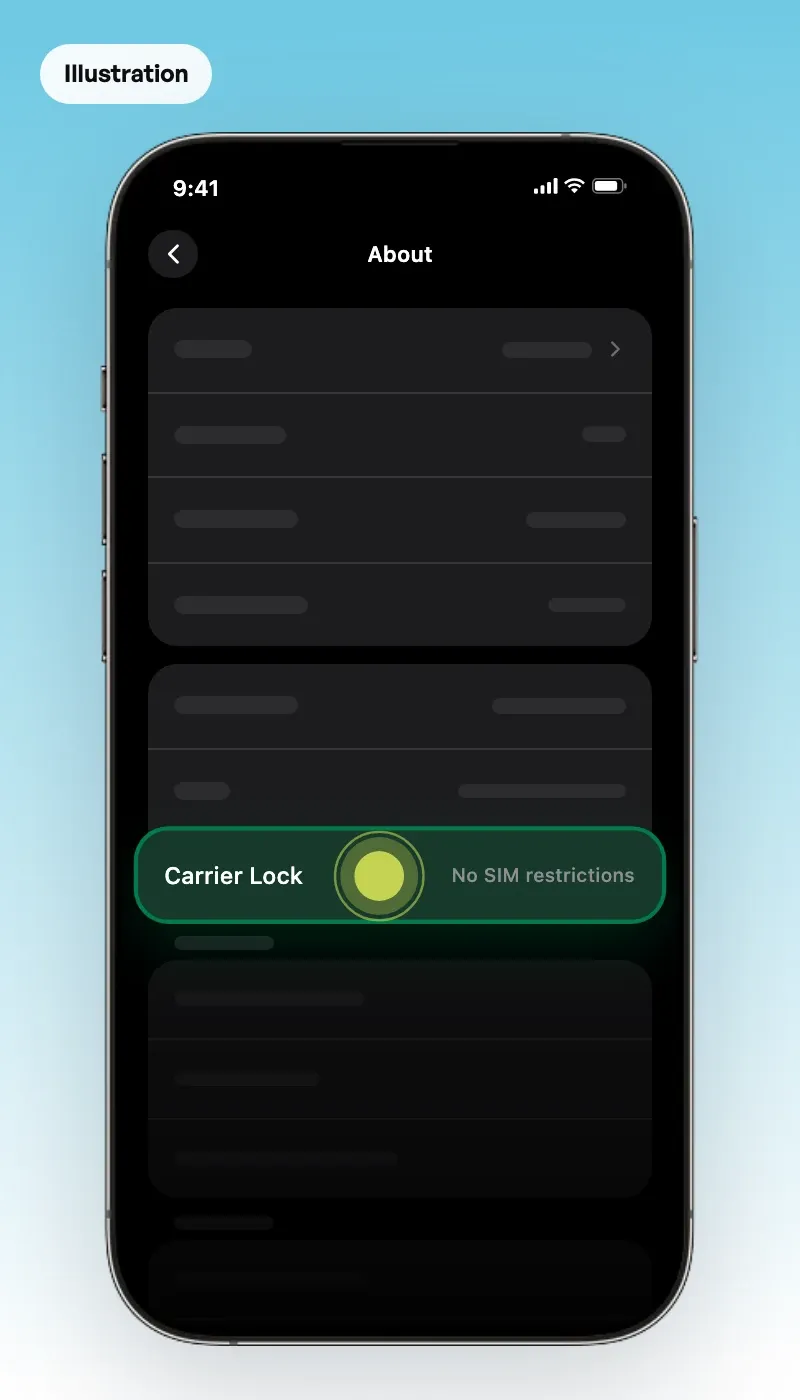
Any other message means it's locked. Only your carrier can unlock it, and Apple says that can take a few days, so ask well before your flight. Apple's guide to eSIM while traveling is clear on this: a locked iPhone can't use another carrier's plan abroad, though it can still roam on your US plan.
US iPhones from the 12 on list Brazil's 700 MHz and 5G bands
Anatel, Brazil's telecom regulator, publishes the bands its carriers use, on a page last updated in August 2023. We matched it against Apple's spec sheets for US models. Every US iPhone below lists Bands 1, 2, 3, 5, 7, 8, 38, 39 and 40. The differences come down to 700 MHz, 5G and how each model runs two lines.
| US iPhone | Band 28 (700 MHz) | 5G n78 (3.5 GHz) | Two lines in Brazil |
|---|---|---|---|
| XS, XS Max, XR | Not listed | No 5G | SIM card plus eSIM |
| 11, 11 Pro, 11 Pro Max, SE (2nd generation) | Not listed | No 5G | SIM card plus eSIM |
| 12, 12 mini, 12 Pro, 12 Pro Max | Listed | Listed | SIM card plus eSIM |
| 13, 13 mini, 13 Pro, 13 Pro Max, SE (3rd generation) | Listed | Listed | SIM card plus eSIM, or two eSIMs |
| 14 and later, including 16e, 17e, Air and Duo | Listed | Listed | Two eSIMs, no SIM tray |
If your row says SIM card plus eSIM, keep your US number on the physical SIM so both lines can run. Older iPhones still list Brazil's other bands, but Anatel warns that a foreign phone missing a band may not work with every carrier or every technology. The XS, XS Max and XR also skip Band 42 at 3.5 GHz. Band 27 is the one band on Anatel's table that no iPhone here lists, and the models Apple pairs with Brazil don't show it either.
An Anatel notice ties Brazil's 5G standalone networks to the 3.5 GHz band, which Apple lists as n78. No 5G on your phone? That matters less than it sounds: Anatel's third-quarter 2026 report counted 69.8 million 5G lines out of 280.5 million, or 24.9%, on preliminary data through August.
Bought your iPhone outside the US? Bands depend on the model number, which you'll find under Settings, General, About. Tap the part number next to Model Number to see it, then look it up in Apple's band list for current iPhones.
We read our plan catalog on October 30, 2026. We read it again on November 27, 2026. HelloRoam's Brazil plans now list TIM on 5G, and Apple's carrier table shows 5G and eSIM for TIM in Brazil. Networks can change, so check the plan page before you buy. Heading on to Argentina or Peru? Our eSIM for South America covers both too, and it listed Claro and Vivo on 5G and TIM on 4G in Brazil.
Install the Brazil eSIM at home on Wi-Fi
Pick your plan size first. If you're not sure, estimate your trip's data needs. Your iPhone has to be on Wi-Fi or a hotspot for setup, and with our plans, installing at home doesn't start the days. You'll install your plan in one of three ways:
- QR code on another screen: open the Camera app and scan it. Tap Cellular Plan Detected, tap Continue, then tap Add Cellular Plan.
- QR code on the same iPhone (iOS 17.4 or later): tap and hold the code in your email, tap Add eSIM, then follow the same prompts.
- Setup link (iOS 17.4 or later): tap the link, tap Allow on the Activate New eSIM notice, then tap Continue.
If a code won't scan, open Settings, tap Cellular, then tap Add eSIM and Use QR Code (or Add Cellular Plan). Tap Enter Details Manually and paste in the details your provider sent. On iOS 26, your iPhone may ask where you'll use the eSIM. Pick Abroad, the travel option, then the data-only plan.
After that, go to Settings, tap Cellular, tap the new line, open Cellular Plan Label and name it Brazil. Then leave it alone. One of our eSIMs is gone for good if you delete it after it has connected, so never delete the line to start over. Our step-by-step iPhone install guide shows each screen. Traveling with someone on a Samsung or Pixel? Our eSIM install guide has their steps too.
Turn the eSIM on when you land in Brazil

Save these steps before you fly, because you may land with no data:
- Open Settings and tap Cellular. Your Brazil line sits under SIMs.
- Tap it and switch on Turn On This Line.
- Go back, tap Cellular Data and pick the Brazil line.
- Tap the Brazil line again and turn on Data Roaming. If you don't see it there, tap Cellular Data Options first.
- Go back, tap your US line and turn Data Roaming off for that line only. If you don't see it there, tap Cellular Data Options first.
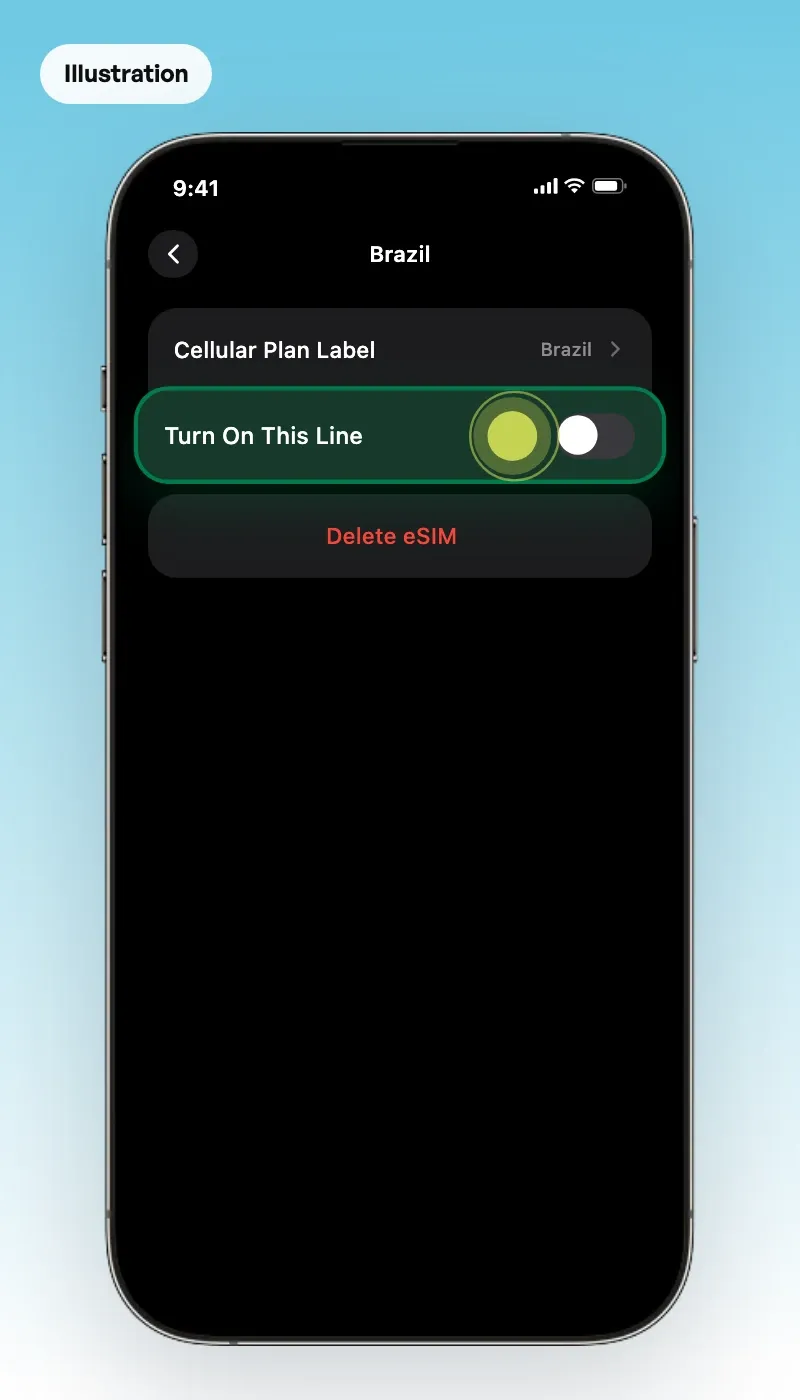
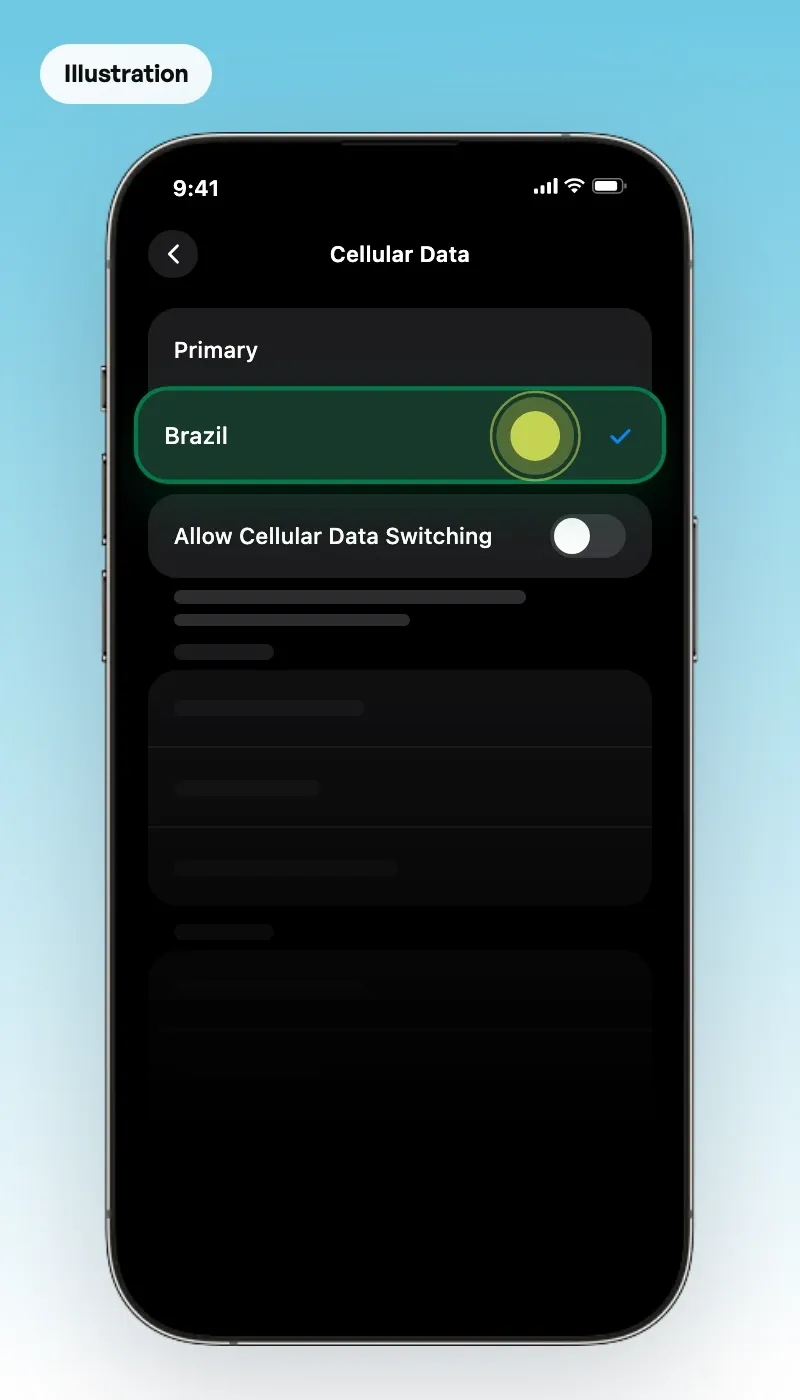
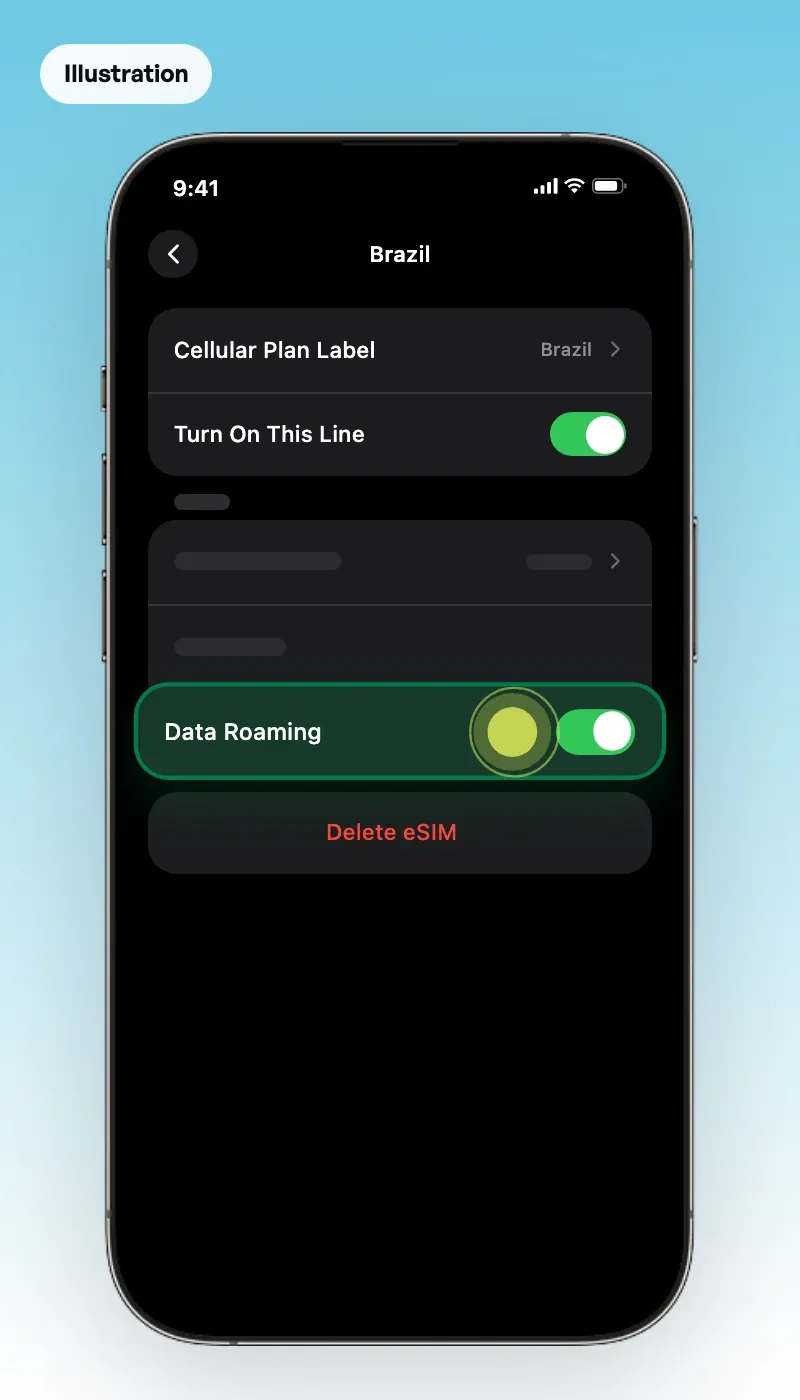
Leave Allow Cellular Data Switching off, so your iPhone doesn't pull data from your US plan. On iOS 26 you may see a Turn On Travel eSIM notice instead. Tap it, then choose Travel eSIM and Current eSIM to keep both lines on, or Travel eSIM Only to run the Brazil line alone. Apple says FaceTime and iMessage keep working on your home line with Travel eSIM Only, but a line that's off can't take calls or SMS codes.
Why get this done before you leave the airport? Our Brazil safety guide for Americans explains how rides and embassy alerts depend on data. Back home, check that your US line is on and switch the Brazil line off. iOS 26 may do this for you.
Your US line can still trigger roaming fees in Brazil
Keeping both lines on means your US number stays reachable, but it also stays on your US plan's roaming terms. Apple warns you might still incur roaming fees from your home eSIM. Here's what the three big US carriers say about Brazil:
- AT&T: Premium 2.0 and Elite 2.0 plans include Brazil at no extra cost. AT&T's Latin America page names only those two. Its support page and Day Pass terms also name Unlimited Premium and Unlimited Elite, so ask AT&T if you have one of those. On other plans, International Day Pass costs $12 a day in Brazil, and AT&T adds it on its own if your line has no other international feature. The 24-hour pass begins the first time you use data, send a text, or make or accept a call.
- Verizon: TravelPass costs $12 a day plus taxes and fees in Brazil, and Verizon adds it automatically on Unlimited Plus and Unlimited Welcome. Unlimited Ultimate can't take TravelPass, because it already includes international data, talk and text. A session starts when you make or answer a call, send a text or use data, and background data can start one once data roaming is on.
- T-Mobile: Brazil is on its included list. Its plan terms say texts aren't charged and calls cost $0.50 a minute, on qualifying postpaid plans.
AT&T's Day Pass terms say texts you receive don't trigger a daily fee. Verizon's pages don't list received texts as a trigger, so ask Verizon how it treats bank codes before you fly. Data Roaming off on the US line stops background data from starting a pass. Calls you make or answer on that line can still start one. iMessage works differently, so see how iMessages use data abroad.
Fix No Service or SOS on your Brazil eSIM
Work through these in order:
- Open Settings, tap Cellular, tap the Brazil line and check that Turn On This Line and Data Roaming are both on. If you don't see Data Roaming there, tap Cellular Data Options.
- Check that the Brazil line is picked under Cellular Data.
- Turn on Airplane Mode for about 30 seconds, then turn it off so your iPhone can choose a network.
- Open Settings, tap General, tap Date & Time and make sure Set Automatically is on.
- Restart your iPhone once. If that fails, try picking Claro, TIM or Vivo by hand under Network Selection, as a test only.
Don't delete the eSIM while you troubleshoot, because our QR code can't be used again after the first connection. Don't edit APN settings either. If it still won't connect, our support team is on WhatsApp and email 24/7 and replies in your language.
A data-only travel eSIM gives you no Brazilian number
Our plans carry data only, so calls and texts stay on your US line and you get no Brazilian phone number. Claro says many services in Brazil ask for a Brazilian number at signup, such as ride apps, food delivery, and hotel and restaurant bookings.
If you need one, Claro sells the flex pass, a plan for international visitors that you set up in the Claro flex app. Claro says you need a passport number and a temporary address in Brazil, not a CPF (Brazil's tax ID), and the eSIM comes with a Brazilian number. Claro's own pages list different data packages, so check the app first. TIM sells prepaid SIM cards to visitors in TIM and partner stores, and it asks for your passport number and where you're staying. Still deciding between a SIM card and an eSIM? Our international SIM and eSIM comparison walks through it for US travelers.
We sell travel eSIMs, so read this with our conflict-of-interest rules in mind. If a local number matters more to you than setting up at home, a Brazilian plan is the better fit.
Questions travelers ask
Can I use my US phone in Brazil?
Yes, if it works on Brazil's networks. Anatel says visitors can use their own phones when they match Brazilian network standards, either by turning on international roaming at home or by buying a local SIM. A travel eSIM needs an unlocked iPhone, while roaming on your US plan doesn't.
Do I need an eSIM for Brazil?
No. You can roam on your US plan or buy a prepaid SIM card in a TIM store after you land. An eSIM's main draw is setup: you buy it before you fly and skip the store, as long as your iPhone is unlocked and supports eSIM.
How much does an eSIM usually cost?
It depends on the data and the days, so there's no single price. Compare plans with the same data and the same number of days, and check the price on each plan's page on the day you buy.
Sources
- Set up eSIM on iPhone (Apple Support, published October 22, 2026)support.apple.com
- Use eSIM while traveling internationally with your iPhone (Apple Support, published October 22, 2026)support.apple.com
- Learn which type SIM your iPhone or iPad uses (Apple Support, published October 22, 2026)support.apple.com
- How to unlock your iPhone for use with a different carrier (Apple Support, published January 22, 2026)support.apple.com
- Using Dual SIM with an eSIM (Apple Support, published October 22, 2026)support.apple.com
- About cellular data roaming options for your iPhone and iPad (Apple Support, published October 22, 2026)support.apple.com
- iPhone: supported 5G and LTE networks (Apple)www.apple.com
- Wireless carrier support and features for iPhone in Latin America and the Caribbean (Apple Support, published May 11, 2026)support.apple.com
- Find the model number of your iPhone, iPad, or iPod touch (Apple Support, published December 9, 2025)support.apple.com
- iPhone XS tech specs (Apple Support)support.apple.com
- iPhone XR tech specs (Apple Support)support.apple.com
- iPhone 11 tech specs (Apple Support)support.apple.com
- iPhone 11 Pro tech specs (Apple Support)support.apple.com
- iPhone SE (2nd generation) tech specs (Apple Support)support.apple.com
- iPhone 12 mini tech specs (Apple Support)support.apple.com
- iPhone 12 Pro tech specs (Apple Support)support.apple.com
- iPhone 13 mini tech specs (Apple Support)support.apple.com
- iPhone 13 Pro tech specs (Apple Support)support.apple.com
- iPhone SE (3rd generation) tech specs (Apple Support)support.apple.com
- iPhone 14 tech specs (Apple Support)support.apple.com
- iPhone 14 Pro tech specs (Apple Support)support.apple.com
- iPhone 15 tech specs (Apple Support)support.apple.com
- iPhone 15 Pro tech specs (Apple Support)support.apple.com
- iPhone 16 Plus tech specs (Apple Support)support.apple.com
- iPhone 16 Pro tech specs (Apple Support)support.apple.com
- iPhone 16e tech specs (Apple Support)support.apple.com
- iPhone 17 Pro tech specs (Apple Support)support.apple.com
- Orientações para aquisição de aparelhos celulares (Anatel, updated August 9, 2023)www.gov.br
- Celular Legal: Perguntas Frequentes (Anatel, updated March 5, 2024)www.gov.br
- Relatório de Monitoramento da Competição, 3T2026 (Anatel, October 2026)sistemas.anatel.gov.br
- Mais 100 municípios terão a faixa de 3,5 GHz disponível para ativação das redes 5G standalone (Anatel, August 23, 2023)www.gov.br
- AT&T International Day Pass (AT&T)www.att.com
- AT&T International Day Pass destinations (AT&T, updated October 20, 2026)www.att.com
- Stay connected in Mexico and Latin America (AT&T)www.att.com
- International plans: TravelPass (Verizon)www.verizon.com
- TravelPass countries (Verizon)www.verizon.com
- International roaming services (T-Mobile)www.t-mobile.com
- International roaming plans: Brazil, rate plan terms (T-Mobile)www.t-mobile.com
- Como Ficar Conectado no Brasil: Guia Completo para Turistas e Visitantes Internacionais (Claro)www.claro.com.br
- How to Get Internet in Brazil Fast & Easy: Tourist Guide (Claro)www.claro.com.br
- Estrangeiros no Brasil: dúvidas frequentes (TIM)www.tim.com.br
- Unlimited Talk, Text, and Data in Latin America FAQ (AT&T, updated April 16, 2026)www.att.com
- International phone plans and travel services (Verizon)www.verizon.com
- Terms & Conditions: AT&T International Day Pass (AT&T)www.att.com
Written by
HelloRoam Team
The HelloRoam Team writes our guides on trip planning, visas and eSIMs. For every new or updated guide, we check each fact at its source. Sources include government, park and weather service pages. We note the date we read each one. A second review then checks every fact against its source before the guide goes live. If we cannot confirm a fact, we leave it out. We link those sources inside the guide, so you can check them.