Quick Answer: Travel eSIM for US Travelers at a Glance
That gap compounds fast. Use your phone every day of a two-week trip, and Verizon's TravelPass costs $168 in roaming fees alone, or $120 at most in a bill cycle on AT&T, whose Day Pass terms cap the charge at 10 daily fees per line. Before you settle for a day pass, check what a HelloRoam travel eSIM costs for your destination.
| Option | Pricing Model | 14-Day Trip |
|---|---|---|
| AT&T or Verizon day pass | $12 per 24 hours of use | $168 on Verizon; AT&T caps one line at $120 per bill cycle |
| T-Mobile International Pass | Fixed pass for 1, 10 or 30 days | $75 for the 30 Day Pass (30GB), if your plan needs a pass |
| Travel eSIM | One prepaid plan, no daily fee | One payment for the plan you choose |
Check your phone first. Every iPhone 14 or later bought in the US works only with an eSIM. On Android, Google Pixel 4 and later phones support eSIM, and so do Samsung Galaxy S20 and later S series phones, except the Galaxy S20 FE and S21 FE.
The activation flow is crisp: buy a plan, scan a QR code, tap install. You land with working data, no activation line required.
How a Travel eSIM Works

An eSIM (embedded Subscriber Identity Module, a chip soldered directly into your device's circuit board) is reprogrammed remotely without swapping physical hardware. You buy a plan, receive a QR code or activation link by email, scan it in your phone's cellular settings, and the profile installs over-the-air in a few minutes.
The underlying technology is the GSMA SGP.22 standard (the global protocol for remote eSIM profile delivery), which replaced physical card handling with encrypted data files that travel wirelessly to your device. That shift matters: you can add or remove a travel plan from anywhere with an internet connection, with no store visit.
What makes this tangible for international travelers: a single phone holds multiple eSIM profiles simultaneously. Your home carrier's profile stays on the device for calls and texts. The travel eSIM carries all your data, so your US line uses no roaming data. Flip the data line in Settings before you board, and the handoff is done.
No language barrier at a foreign carrier counter. No hoping a kiosk SIM activates before your Uber arrives. No paperclip, no plastic card to lose in a carry-on pocket.
Dual SIM setup: keeping your US number active abroad
Dual SIM lets you keep your US number active for calls and texts while routing all data through a separate travel eSIM. Your US number still receives banking alerts, two-factor authentication codes and calls, and the travel eSIM's data never touches your US line.
The setup takes a few taps in Settings on any iPhone that supports Dual SIM. The payoff shows up when a bank sends a verification code abroad. With dual SIM running, that text lands on your US number exactly as it would at home, not into a void that locks you out of a login.
Setting it up on iPhone:
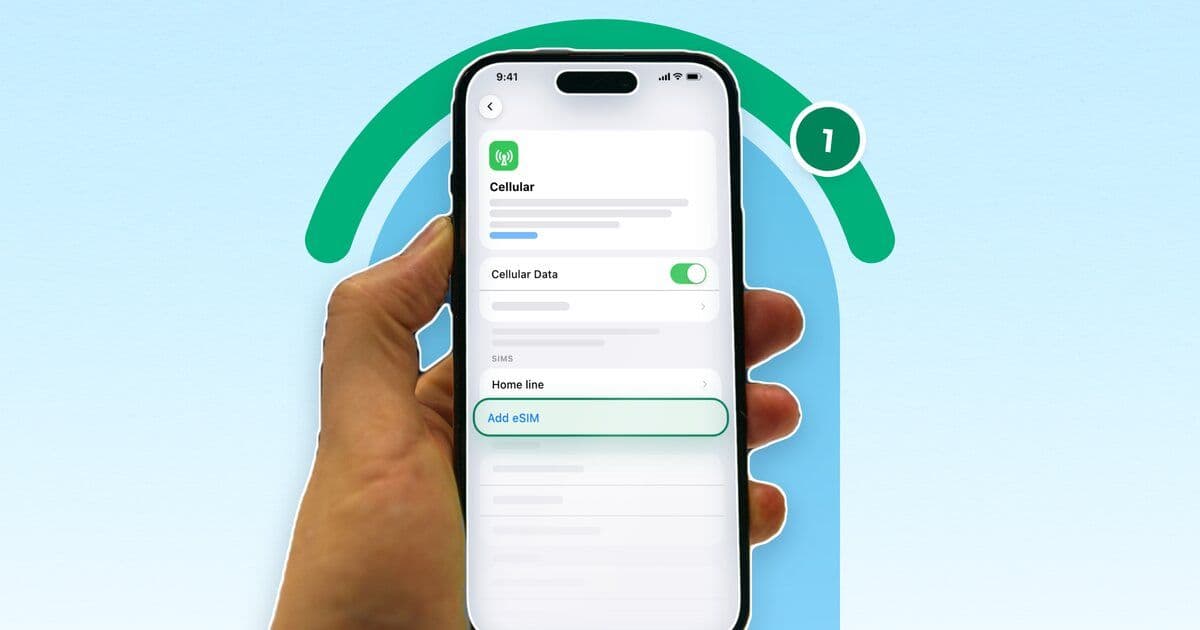
- Install the travel eSIM by scanning the provider's QR code in Settings > Cellular > Add eSIM
- Label each line (e.g., "Home" and "Travel") so they're easy to tell apart
- Set the travel eSIM as your default for Cellular Data
- Turn on Data Roaming for the travel eSIM line, so it can connect to local networks when you land
- Keep your home line as the Default Voice Line
- Leave "Allow Cellular Data Switching" off, so your iPhone uses only the travel eSIM for data
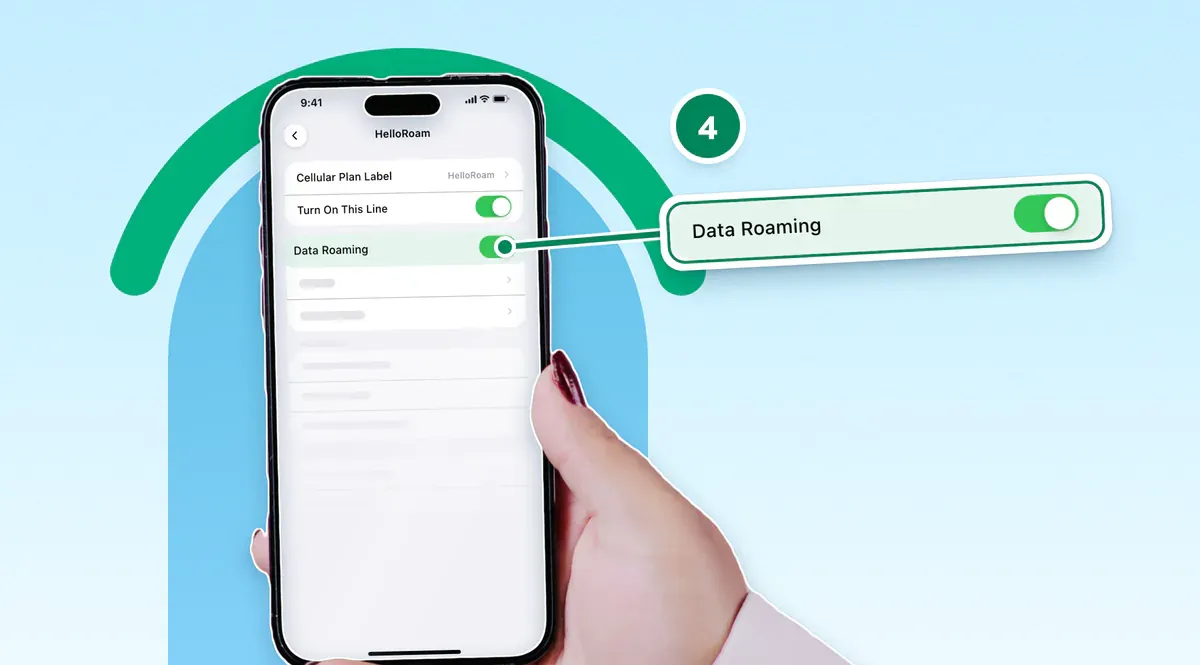
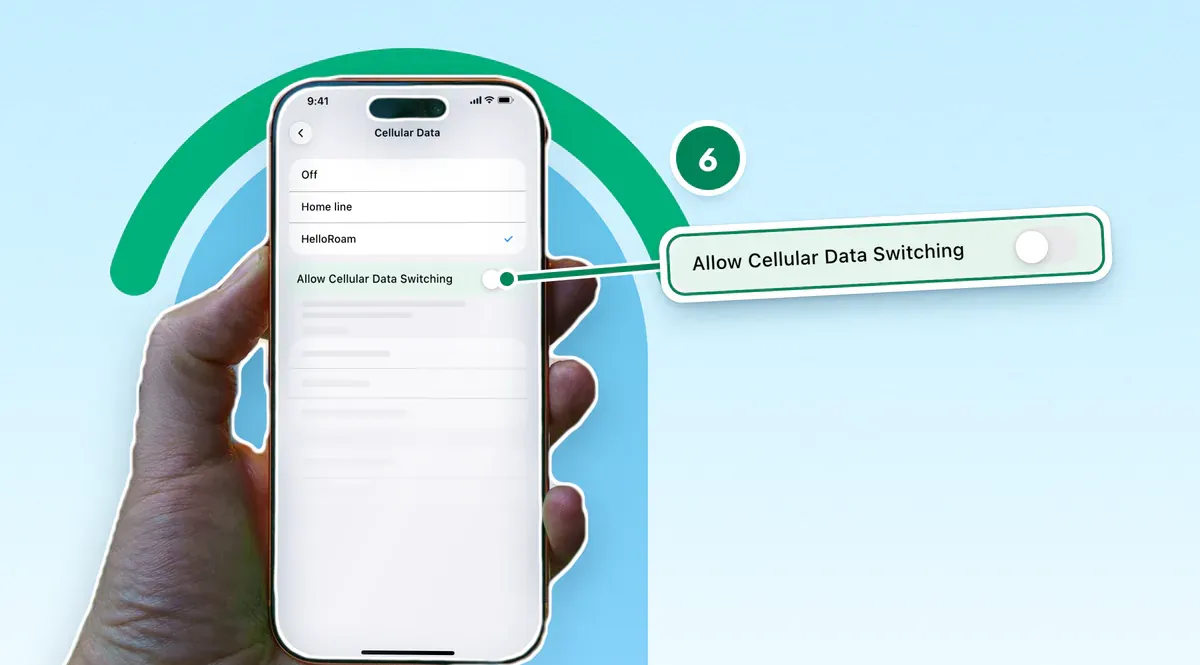
Once configured, your US line keeps receiving calls and texts while the travel eSIM carries all data, so your home carrier logs no international data use. Calls still roam: AT&T starts a day pass when you make or answer one, Verizon does too when TravelPass is on your line, and T-Mobile bills $0.50 a minute on many plans. A calling app on the travel eSIM's data avoids these charges.
What US Carriers Charge for International Data
Verizon's TravelPass and AT&T's International Day Pass each charge $12 for every 24 hours of use in most countries. Verizon charges $6 a day in Mexico and Canada, though its Unlimited plans include calls, texts and data there at no extra cost. The 24 hours start with your first data use, call or sent text abroad, and on Verizon background app data can start them too. T-Mobile instead sells fixed International Passes, priced at $10 for 1 day (2GB), $50 for 10 days (15GB) or $75 for 30 days (30GB). Check your carrier's own page before you fly, because prices change.
What carrier day passes get right
The case for a carrier day pass is real for short trips. Your existing US number handles calls and texts without any additional setup. Apps work exactly as they do at home. For a 48-hour conference trip with reliable hotel broadband, it's a no-brainer.
T-Mobile's plans work differently. Experience Beyond 2.0 includes up to 15GB of high-speed data in 215+ countries and destinations, and Experience More 2.0 up to 5GB, then data slows to 256kbps. Essentials plans need a pass for data outside Mexico and Canada, so check your plan's international terms before buying any add-on.
Where the per-day model falls apart
The structural flaw is that every day of use is a new charge. AT&T's International Day Pass and Verizon's TravelPass each last 24 hours from your first use, and the next call, sent text or data session after that starts another. By day 14, the running total lands exactly where this guide's opener warned it would.
The math tilts toward a travel eSIM as the trip gets longer. You pay once for a set amount of data and days, with no charge for each day you use it.
Side-by-side comparison
| Feature | Carrier Day Pass | Travel eSIM |
|---|---|---|
| Billing model | Per 24 hours of use (AT&T, Verizon) or fixed pass (T-Mobile) | Flat rate, full trip |
| Best fit | Short trips of a day or two | Longer trips |
| Voice calls | Included | Data only (most plans) |
| Hotspot | Varies by plan tier | Varies by plan |
| Setup required | Added automatically on AT&T and some Verizon plans; bought in the T-Life app on T-Mobile | QR install before departure |
One practical note for arrival day: a travel eSIM installed at home means maps and ride-share apps work as soon as you land, with no scramble for terminal Wi-Fi.
How to Choose and Activate a Travel eSIM Before Your Trip
Check device compatibility first, choose between a single-destination plan or a regional bundle based on your itinerary, then install the eSIM profile at home on Wi-Fi the night before you fly.
Step 1: Confirm your device is eSIM-ready and unlocked
If your model isn't named above, check if your phone supports eSIM before you buy. On iPhone, go to Settings > General > About and look for an EID line. No EID means no eSIM. Also confirm the device is carrier-unlocked, because only your carrier can unlock it.
Step 2: Pick between single-destination and regional plans
Single-destination plans cost less when your trip stays in one country. Regional plans pool data across multiple countries and make sense the moment your itinerary crosses a border. HelloRoam sells both, and its regional plans, such as Europe, keep one eSIM working across every border the plan covers.
Step 3: Purchase and save your activation code
If your seller takes Apple Pay or Google Pay, checkout takes seconds without typing card details. A QR code or activation link arrives by email, typically within minutes of purchase. Screenshot it and save it to your camera roll before leaving home.
Step 4: Install the eSIM profile the night before departure
Open the QR code, tap Add eSIM when prompted, and follow the on-screen steps. Do this on home Wi-Fi, not at the gate, because the profile downloads over the internet and needs a strong connection.
Step 5: Verify the plan appears in Settings > Cellular
The travel plan should show alongside your home carrier. Signal won't appear until you land abroad. Seeing it listed confirms installation succeeded.
Regional vs. global coverage: matching the plan to your itinerary
Regional plans share one data allowance across a group of countries, so they suit a trip that crosses borders inside one region. Global plans cover the most ground, for routes that span continents, but cost more per gigabyte.
Single destination: One country, clear itinerary. A single-destination plan is the right call, and you pay only for the country you're visiting.
Regional bundle: Two or more countries in the same region (Europe, Southeast Asia, Latin America). Your phone connects to available local networks automatically as you cross each border. One important check before purchasing: verify the specific country list. "Europe" coverage varies between providers and may exclude nations on your route.
Global plan: Multi-region routing or an itinerary that spans continents. Worth the premium when your trip crosses into multiple regions or your final routing isn't locked in at departure.
A Travel eSIM Needs a Carrier-Unlocked Phone
Your phone needs unlocking only if it's carrier-locked. A locked device rejects any eSIM profile from outside that carrier's network. An iPhone bought from a carrier can still be locked, and Verizon keeps a phone on a payment plan locked until it is paid off.
The lock is easy to miss, because a locked phone works normally on its own carrier's network. Find it at the departure gate and you can't fix it there, since only your carrier can unlock the phone.
Android is messier. Google Pixel phones bought directly from Google ship unlocked. Samsung Galaxy devices purchased through AT&T, Verizon, or T-Mobile can stay locked until they meet that carrier's unlock rules, such as time on the network or a paid-off balance. The same Samsung Galaxy S25 can arrive locked or unlocked, depending on whether you bought it through a carrier or as an unlocked model.
To check your lock status on iPhone, go to Settings > General > About and look for "No SIM restrictions" next to Carrier Lock. On Android, the path varies by maker, so ask your carrier if you can't find it.
If your phone is locked, submit an unlock request before you leave. A carrier can take a few days to complete it, Apple says, and eligibility rules apply. T-Mobile and AT&T both publish their unlock requirements on support pages. Submit at least a week before departure. A processing delay the morning of a flight is a grinding way to begin a trip.
When Your Travel eSIM Runs Out of Data

Most travel eSIM plans pause data access the moment your allowance runs out. Not throttled, not slowed: completely paused. Maps stop loading mid-route and messaging apps go quiet until you top up or switch sources. Knowing your recovery options before departure is the practical difference between a quick fix and a frantic hunt for airport Wi-Fi.
Data running out abroad is rarely a disaster. It feels like one.
The standard recovery path is an in-app top-up. Most eSIM apps let you add data directly to an active plan without canceling and repurchasing.
What most travelers miss: if your plan expires entirely rather than just exhausting its data, your phone may fall back to your home carrier's international roaming automatically. That fallback triggers the daily rates discussed earlier in this guide. Before you leave, check whether your carrier starts a day pass on its own (AT&T adds its Day Pass on first use abroad if your line has no other international feature, and Verizon adds TravelPass to some plans), and keep the travel eSIM as your cellular data line with data switching off. If your US line has its own data roaming switch, as on iPhone and Pixel, turn that one off too. Many Samsung Galaxy phones have one switch for the whole phone, so leave it on there, or the travel eSIM loses data as well.
Offline maps are free insurance. Google Maps and Apple Maps both support downloading full cities and regions for navigation without any data connection at all, though not in every country. Combine that with data-saver mode enabled and background app refresh switched off for social media, and your allowance stretches considerably further than it would on default settings.
Review the top-up steps inside your eSIM app at home, not at a train station in Lisbon.
Sources
- AT&T International Day Pass terms and conditionswww.att.com
- Verizon TravelPass FAQswww.verizon.com
- Verizon TravelPass plan pagewww.verizon.com
- T-Mobile International Passwww.t-mobile.com
- T-Mobile international roaming: data, texting and calling abroadwww.t-mobile.com
- Verizon device unlocking policywww.verizon.com
- How to unlock your iPhone for use with a different carrier (Apple Support)support.apple.com
- Use eSIM while traveling internationally with your iPhone (Apple Support)support.apple.com
- Set up eSIM on iPhone (Apple Support)support.apple.com
- Remove or switch the SIM card in your iPhone (Apple Support)support.apple.com
- Use dual SIMs with your Pixel phone (Google Pixel Help)support.google.com
- SIM cards for your Galaxy phone or tablet (Samsung US)www.samsung.com
- SGP.22 RSP Technical Specification v2.1 (GSMA)www.gsma.com
- Using Dual SIM with an eSIM (Apple Support)support.apple.com
- Find the serial number, EID, or IMEI on your iPhone, iPad, or iPod touch (Apple Support)support.apple.com
- Use your Pixel phone with any mobile carrier (Google Pixel Help)support.google.com
Written by
HelloRoam Team
The HelloRoam Team writes our guides on trip planning, visas and eSIMs. For every new or updated guide, we check each fact at its source. Sources include government, park and weather service pages. We note the date we read each one. A second review then checks every fact against its source before the guide goes live. If we cannot confirm a fact, we leave it out. We link those sources inside the guide, so you can check them.