What an eSIM is: the short answer
Your UK number stays fully active throughout. The eSIM runs a separate data profile alongside your existing SIM, so you're reachable on your normal number while your data goes through the travel plan. Apps such as WhatsApp and iMessage run over that data, so your chats carry on as normal.
Compatibility goes back roughly to 2018. Every iPhone from the XS and XR onwards supports it, as do many Android handsets from Samsung, Google and others, though not every budget model. Before purchasing a plan, check that your specific model is confirmed. HelloRoam's eSIM Compatible Devices page lists supported handsets by model, which saves a wasted purchase.
How an eSIM works inside your phone
An eSIM stores carrier information as a digital profile on a chip called an eUICC (embedded Universal Integrated Circuit Card, the component that holds your SIM data). Instead of reading credentials off physical plastic, your phone reads them from this embedded chip. The GSMA's Remote SIM Provisioning standard sets how profiles are delivered and stored, which is why an eSIM plan bought in London works on an iPhone 16 as well as on a Samsung Galaxy S25.
When you scan a QR code or install a profile through a provider's app, the carrier's details download directly onto the eUICC. After installation, your phone's Settings menu shows the new profile sitting alongside your UK SIM. You choose which profile handles data, calls, or both.
On activation abroad, your handset broadcasts to local towers using the eSIM profile's credentials. The network authenticates your device and grants access. From that point, you use the local network much as a local SIM would, though a travel eSIM line usually needs its own data roaming switch on. Your data uses the local network's masts and never passes through your UK network, so your UK network's roaming charges don't apply to it.
The 'one data line at a time' rule matters in practice. You can store several profiles: one for Europe, one for Asia, your UK plan as the default. Only one handles data at any given moment, and switching takes a few taps: on iPhone, open Settings and pick the line under Mobile Data.
One detail to check before buying: many travel eSIMs carry data only, with no phone number of their own. If you need to make normal calls or send texts on the eSIM line, check that the plan includes a number before purchasing. With a data-only plan, normal calls and texts stay on your UK SIM, which is usually exactly what you want.
Install the profile at home, on your own Wi-Fi, before you fly. It sits dormant until you land and switch it on. Connectivity isn't something you sort in the arrivals hall, surrounded by jet-lagged passengers and dodgy airport Wi-Fi.
eSIM vs physical SIM vs roaming: the honest comparison
A travel eSIM is often cheaper than paying your network's daily roaming charge, and, unlike a local SIM, you can set it up before you board. Things changed after Brexit, when several major UK networks brought back EU roaming charges and roaming became a real line item on the bill.
| Carrier roaming | Physical local SIM | Travel eSIM | |
|---|---|---|---|
| Setup | Usually automatic; check roaming is on for your account | On arrival at a local kiosk | Before departure, on home Wi-Fi |
| EU surcharges | Yes on many EE, Three and Vodafone UK plans; none on O2 within its data limit | None, priced locally | None, routes through local network |
| Multi-country | Check plan terms | Usually one country | Regional plans cover several destinations |
| UK number active | Yes | No, if the local SIM replaces your UK SIM | Yes |
| Data limits | Fair-use caps apply, Three Go Roam included | Varies by local provider | Check plan terms before purchasing |
We read the roaming pages of EE, O2, Three and Vodafone UK in October 2026. Of the four, only O2 said all its pay monthly and pay as you go customers can use their allowance in its Europe Zone at no extra cost, up to a data limit. EE, Three and Vodafone UK charge by the day on many plans unless the plan includes roaming or you add a pass. Plans differ, so check your own network's roaming page before you go.
A physical SIM from an airport kiosk or local shop can be the cheapest option per gigabyte once you're on the ground. The catch is the arrival experience: find the kiosk, queue, configure the APN (your phone's network gateway setting), all while jet-lagged and working out which way the baggage carousel turns. If your UK number is on a physical SIM and your phone has one SIM slot, it goes offline while the local SIM sits in the tray, which creates a gap precisely when banks tend to send verification texts.
Travel eSIMs sidestep that entirely. Configure on the sofa, fly, land connected. A single regional eSIM plan can cover Spain, Portugal and France in one purchase without touching the SIM tray, and you pay for it once, up front, not by the day.
For anything longer than a long weekend or crossing more than one border, a dedicated travel eSIM is usually the more sensible choice on cost and convenience, unless your UK plan already includes every country on your route.
An eSIM has trade-offs. It can't be pulled out of a lost or stolen phone, which Apple counts as a security gain, but there's also no card to move into a new phone if yours breaks, so moving the plan depends on your provider. Some phones can't take an eSIM at all. Our rundown of eSIM advantages and disadvantages covers the rest for UK networks.
How to set up a travel eSIM before you fly
Setting up a travel eSIM takes five steps, and the first four happen on your sofa, days before departure. Buy a plan online, receive a QR code by email, scan it in your phone's settings, label it and set it as your data line, then switch it on when you land. Your UK SIM stays active for calls. No kiosk queue, no plastic.
Step 1: Buy your plan before you leave the UK
Purchase your data plan online before travel day. Your confirmation email carries the QR code you scan in step 2.
Step 2: Scan the QR code in Settings
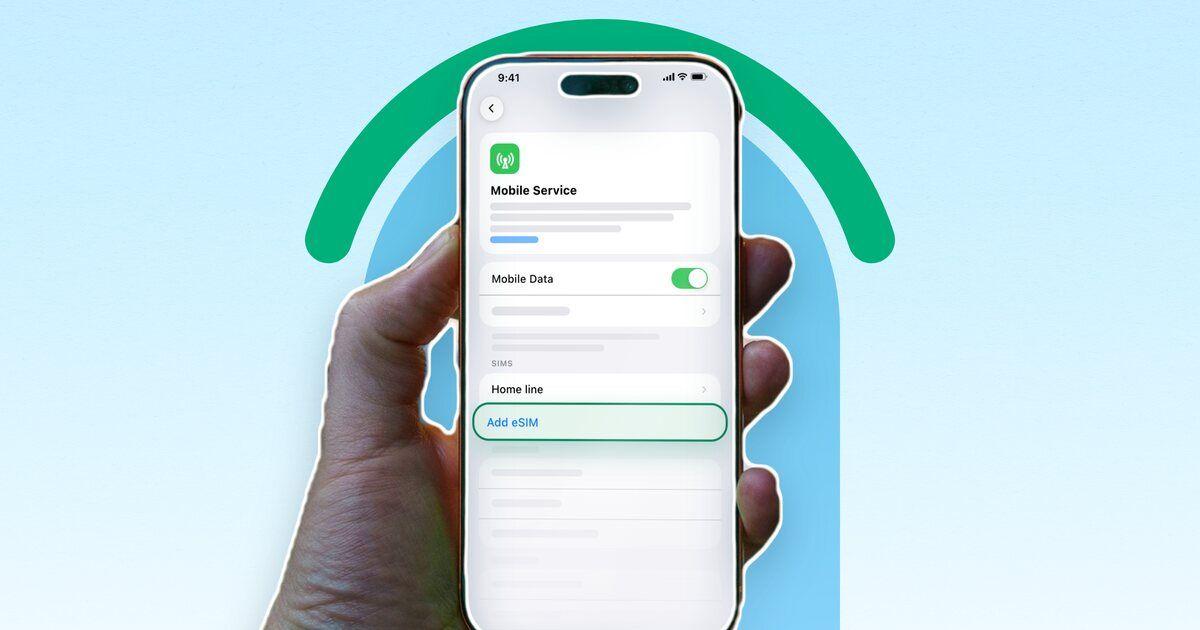
On iPhone, go to Settings > Mobile Service > Add eSIM. On Android, the path varies by manufacturer: on Samsung, go to Settings > Connections > SIM manager > Add eSIM. Tap to scan the QR code from your confirmation email. On iOS 17.4 or later, if the email is open on the same iPhone, tap and hold the QR code instead, then tap Add eSIM. The eSIM profile downloads directly to your handset.
Step 3: Give it a clear label
When prompted, name the new plan something obvious: 'Travel data', 'Japan trip', or just the destination country. You'll thank yourself later when toggling between lines in a crowded airport terminal. On most phones, you can also set per-line defaults at this stage, choosing which SIM handles calls and which handles data.
Step 4: Assign it as your primary data line
Set the travel eSIM as your default data SIM. Keep your physical UK SIM active for calls and texts. That dual-SIM setup means bank verification texts still reach your UK number while your data goes through the travel plan. Calls and texts you make on the UK line still use your UK allowance abroad, so on a plan without roaming built in they can start your network's daily charge.
Step 5: Switch it on when you land
Leave the eSIM line off until you land. On arrival, turn the line on and turn on data roaming for it, so it can join the local network. Then choose it for mobile data. Providers start a plan's days at different moments, some only at the first connection in your destination, so check your plan's terms.
One more thing: do steps 1 to 4 while you're still on home Wi-Fi. Installing the profile usually needs an internet connection, and airport Wi-Fi is patchy enough to cause genuine problems.
What to check before you buy a travel eSIM plan
A good travel eSIM plan routes data through the destination's leading mobile networks, states its speed limits plainly, and confirms hotspot support in the terms. Validity period and support access round out the five criteria that separate a plan worth buying from a frustrating one.
Coverage tier
Not all networks in a country carry equal weight. Your plan uses the masts of the network it names, so its coverage is that network's coverage. The network name in your plan's small print is the one to check against a coverage map before you commit.
Fair-use limits
Even 'roaming included' has limits on UK plans, so it pays to know what data roaming costs before you go. O2, Three and Vodafone UK all cap how much data you can use in Europe, and Vodafone UK charges for every GB over its cap.
A travel eSIM plan can have limits too. Read its terms for any fair-use limit or slower speeds before you buy.
Hotspot and tethering
If you plan to share data with a laptop or a travel companion, confirm tethering is explicitly included in the plan terms before purchase. Some plans block it entirely. The terms will say: check before you buy, not after you land.
Validity period
Match the plan to your trip length. A 7-day plan on a 10-day holiday ends before you fly home, so size the plan to the trip from the start. Three's Go Roam lets you use your UK allowance abroad, often for a daily fee, but that's a home-network add-on, not a standalone plan you can shape around a specific trip. At the other end, a 30-day eSIM bought for a 5-day city break is rarely good value.
Support channel
A problem with eSIM activation hits particularly hard when you're standing in an unfamiliar airport with no signal. Support you can reach around the clock, by email or a messaging app, is a different proposition from a ticket queue that may not answer until the next working day. Time zones make that gap worse than it sounds.
How to check your phone works with an eSIM
Most iPhones from 2018 onwards support eSIM, and so do recent flagship Android phones, but many budget and older Android models don't. Two conditions need to be true before a third-party eSIM profile will install. The handset must carry the eUICC chip and it must be unlocked from your network. Hardware alone gets you halfway.
Myth: a new phone means automatic eSIM support
Not exactly. Some new budget phones still can't take an eSIM in the UK. Samsung's own list, for example, names its Galaxy A26 as an eSIM phone in North America only. Check your exact model before you buy a plan.
Which handsets support eSIM?
The main models:
- iPhone XS (2018) and all later models carry native eSIM support. Most UK iPhone 14 and later models take a nano-SIM as well as an eSIM, unlike the US versions, which have no SIM tray. The iPhone Air and iPhone Duo take an eSIM only, in the UK too. Our guide to using a travel eSIM on an iPhone covers setup and dual SIM in more detail.
- Samsung Galaxy S20 and later S-series phones carry eSIM support, as do the Galaxy Z Fold and Z Flip foldable ranges. Samsung's list leaves out the S20 FE and S21 FE.
- Google Pixel 3a and later can use an eSIM alongside a physical SIM card, the setup that keeps your UK number live while the travel eSIM handles data.
The list of compatible handsets expands with each product cycle, so the manufacturer's specification page is the most reliable reference if your model isn't named here.
Myth: 'I already checked and my phone doesn't have it'
This is where people get caught: eSIM support can depend on the country a phone was sold for, not just its model name. The definitive check is in Settings. On iPhone: Settings > Mobile Service > Add eSIM. On Samsung: Settings > Connections > SIM manager > Add eSIM. If the option appears, the hardware is there. It doesn't tell you whether the phone is unlocked, so check that too: on iPhone, go to Settings > General > About and look for 'No SIM Restrictions' next to Network provider Lock.
What about carrier-locked handsets?
Most phones sold in the UK since late 2021 come unlocked, because Ofcom rules have banned mobile companies from selling locked handsets since 17 December 2021. Older handsets, or those bought on contract deals before that, may still carry a carrier lock. If yours does, ask your network to unlock it well before you travel, and check its unlock page for any conditions.
Running out of data abroad and topping up
Running out of data on a travel eSIM doesn't trigger a surprise bill. Most plans pause your connection when the allowance is spent, rather than switching to per-megabyte charges.
Topping up is straightforward. Open the provider app, buy more data, and it goes onto the same eSIM already installed in your handset. With HelloRoam, top up before the plan's end date: an expired eSIM can't take a top-up, so after that date you buy a new plan instead.
Your physical UK SIM keeps working throughout. Incoming calls and texts continue arriving on your British number even when data is exhausted. That matters more than most people expect: bank two-factor authentication codes, hotel booking confirmations, an airline SMS if your return flight changes.
Download offline maps for your destination while still at home, save boarding passes to your phone's Wallet app, and screenshot any hotel addresses or taxi numbers you'll need without a connection. A depleted data allowance becomes a minor inconvenience rather than a proper headache when the essentials are already cached locally.
HelloRoam offers round-the-clock support for mid-trip queries, which proves useful if you're unsure which top-up option suits the rest of your stay, or if something unexpected crops up in an unfamiliar time zone.
Running dry abroad is a practical bump, not a financial emergency.
Sources
- O2: Roaming and international (Europe Zone)o2.co.uk
- Three: Go Roamthree.co.uk
- EE: Roaming costsee.co.uk
- Vodafone UK: Global roamingvodafone.co.uk
- Ofcom: Mobile companies now banned from selling locked handsetsofcom.org.uk
- Apple: Set up eSIM on iPhonesupport.apple.com
- Apple: Use eSIM while travelling internationally with your iPhonesupport.apple.com
- Apple (UK): iPhone 17 tech specsapple.com
- Apple (UK): iPhone Air tech specsapple.com
- Apple (UK): iPhone Duo tech specsapple.com
- Apple (US): iPhone 17 tech specsapple.com
- Samsung UK: Galaxy eSIM and supported network carrierssamsung.com
- Android Open Source Project: eSIM implementation overviewsource.android.com
- Google: How to use dual SIMs on your Google Pixel phonesupport.google.com
- HelloRoam: When to install your eSIMhelloroam.com
- HelloRoam: Top up an eSIMhelloroam.com
- GOV.UK: Using your mobile in EU and EEA countriesgov.uk
- Apple: Using Dual SIM with an eSIMsupport.apple.com
- HelloRoam: Calls, texts and your numberhelloroam.com
Written by
HelloRoam Team
The HelloRoam Team writes our guides on trip planning, visas and eSIMs. For every new or updated guide, we check each fact at its source. Sources include government, park and weather service pages. We note the date we read each one. A second review then checks every fact against its source before the guide goes live. If we cannot confirm a fact, we leave it out. We link those sources inside the guide, so you can check them.